10-Step Implementation Checklist for Secure Development
 Reza Khosravi
Table of Contents
Security can't be a document you update once. Faster delivery, AI-assisted coding, and shifting architectures make point-in-time reviews stale almost as soon as they're signed off, which is why a real implementation checklist has to act like an operating plan, not a filing cabinet. The strongest programs establish security context first, place feedback inside existing workflows, assign decision ownership, enforce approved policies, verify what shipped, and keep improving from evidence. That's the shift from ad hoc rollout to structured deployment practice, the same direction reflected in the literature on implementation checklists, which had already accumulated 894 publications describing implementation frameworks by 2023, including 15 systematic reviews (peer-reviewed implementation-checklist review).
That matters because implementation work stops being a one-time control and becomes a repeatable system. A checklist is especially useful when teams need to connect tickets, design docs, repositories, and service metadata without forcing parallel documentation, which is also why platforms like DevArmor fit this model when they're used well. For teams looking at the broader documentation problem, Faberwork LLC's discussion of technical documentation is a useful reminder that documentation has to move with the work, not behind it.
1. Define Security Artifacts and Data Sources
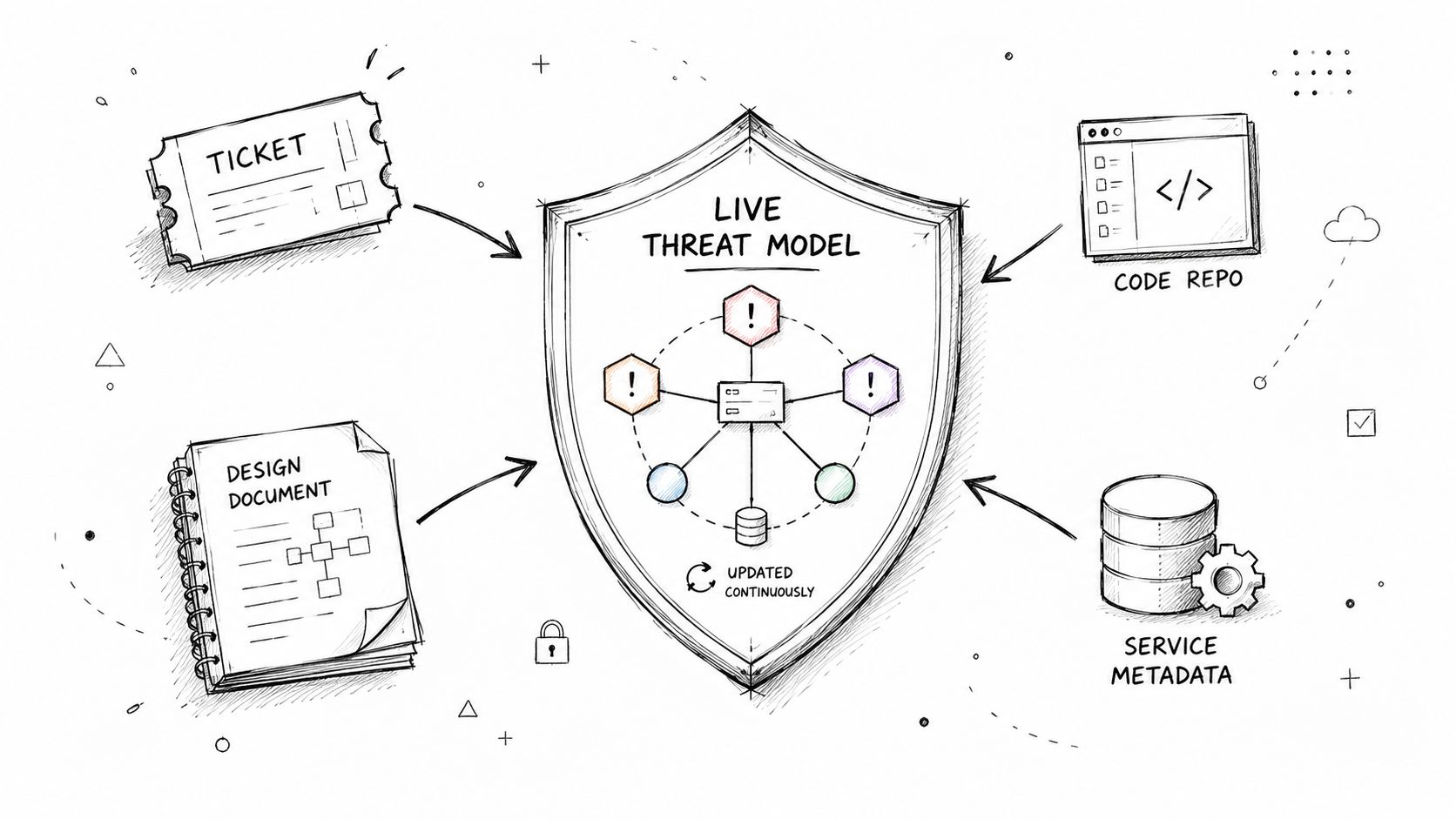
The first mistake teams make is treating “security context” as a single document. It isn't. It's a live set of artifacts, tickets, design docs, repositories, service metadata, diagrams, and approval trails, and the checklist only works when those sources are named up front and kept in scope.
A FinTech team might tie payment-service design docs to threat models so a change in token handling shows up in the same security context as the related Jira ticket. A HealthTech team might connect HIPAA compliance tickets to data-flow diagrams so PHI handling doesn't get lost between product and security reviews. A media platform can do the same with service-topology changes and refreshed threat assessments when a new delivery region is introduced.
Start with the artifacts you already trust
Catalog the sources that already drive decisions, then decide which ones are authoritative for security. If a team debates design in Google Docs but records final commitments in Jira, the checklist should treat both as inputs, but only one as the approval record. That distinction keeps the system from drifting into duplicate truth.
Practical rule: if an artifact can't be tied to a real owner and a real service, it shouldn't drive a security decision.
Naming conventions matter more than many teams expect. If a service is called three different things across tickets, code, and deployment metadata, the checklist will miss joins and the threat model will fragment. Start small, prioritize high-risk flows, and audit source coverage regularly so drift gets caught before it turns into blind spots.
2. Map Existing Workflows and Tool Integration Points
Security breaks down when it lives outside the tools where decisions already happen. The checklist should map where context belongs, in the IDE, the pull request, the planning ticket, the documentation draft, and the deployment pipeline, then place the right control there. That keeps the process visible at the point of action instead of making people chase it across systems.
A developer in VS Code or Cursor needs threat context while the code is still easy to change. A reviewer in GitHub needs policy feedback where the merge decision is made. A security architect in Jira needs design decisions tied to the sprint record, not trapped in a separate meeting that no one can trace later.
Start with the places where teams already pause and choose. If a project manager opens a ticket to confirm scope, that ticket should carry security context. If a pull request changes data handling, that change should surface policy feedback. If deployment reviews happen in a pipeline, that is where implementation verification should live.
Reduce context switching before you add more controls
A checklist that adds another dashboard, another approval app, or another meeting is usually the wrong shape. The point is not to create a parallel security process. It is to use the decision points the team already trusts and make them security-aware.
DevArmor's workflow integrations fit this model because they surface security context in Jira, Google Docs, GitHub, VS Code, and Cursor, so the checklist stays inside normal delivery work instead of sitting beside it. Placement matters more than polish. People are more likely to act on a policy warning in the pull request than on the same warning buried in a separate report.
That same principle applies to agent workflows and code generation, where guardrails work best when they appear at the moment a risky choice is made. DevArmor's note on AI coding security describes that in-workflow approach directly. Keep the feedback near the decision, and keep the decision near the artifact.
3. Define Team Roles, Permissions, and Review Workflows
Security work breaks down fast when nobody can answer who approves what. The implementation checklist should define the minimum role set, who owns the threat model, who reviews risk, who can override a policy, and who gets notified when a design changes. Without that, the process either stalls or turns into informal approval by whoever happens to be online.
A simple role model is usually enough at the start. A Security Owner maintains the threat context, a Team Lead owns product and delivery trade-offs, and a Developer handles implementation changes. From there, you can add compliance, privacy, or architecture sign-off where regulation or criticality demands it.
Many teams overcomplicate things. They add too many approvers before they've even stabilized the basic review path. The result is a queue, not a control.
Make escalation explicit, not tribal
Escalation thresholds should be written down. If a critical policy bypass needs CISO approval, say so. If PHI-related changes require privacy review, state that in the checklist. If a service boundary change must be reviewed by the owning architecture group, map that to the component or data flow, not to a vague “security team” bucket.
When role assignments are fuzzy, the loudest stakeholder becomes the de facto approver.
Quarterly role reviews are worth the effort because permissions go stale. People move teams, systems evolve, and old approvals keep living in the background long after the original owner has changed. In regulated environments, that stale ownership can become a governance issue, not just a workflow nuisance.
A good workflow also prevents bottlenecks. The right reviewer should see the right artifact at the right time, and everyone else should stay out of the critical path unless the risk level justifies escalation. That keeps the checklist usable instead of ceremonial.
4. Configure Continuous Threat Modeling Parameters
Threat modeling only works if the model stays current enough to matter. A checklist should define what types of threats matter most, what triggers a refresh, and how deep the analysis should go for different services. If every change causes a full re-analysis, the team will ignore it. If nothing triggers a refresh, the model is already obsolete.
The strongest setups begin with threat categories relevant to the domain, then tie updates to real work events. A code push, a design-doc change, or a ticket update can all be meaningful triggers when they reflect architecture or data-flow changes. That makes the model continuous in practice, not just continuous in theory.
The point is not to simulate every possible attack. The point is to keep the risk picture aligned with what the team is building.
Tune for service criticality
Not every service deserves the same depth. Critical payment paths, PHI handlers, and externally exposed infrastructure need tighter modeling than low-risk experimental components. The checklist should reflect that difference so the team doesn't drown in noise.
A conservative configuration usually works best at first. Start with the threat categories your team already understands, then widen scope once people trust the results. Weekly review of outputs during the early phase is a good discipline because it surfaces false positives, missing dependencies, and naming drift before they spread.
The practical trade-off is clear. More refresh triggers create more sensitivity, but they can also create alert fatigue. Fewer triggers reduce noise, but they let real architecture shifts slip past unnoticed. The checklist should force the team to balance those two problems explicitly instead of pretending they don't exist.
5. Establish a Policy-as-Code Framework
Policy-as-code is the point where the checklist becomes enforceable. Approved threat models and security requirements turn into executable rules that run at review or merge time. Every enforcement action stays tied to a design decision, which gives regulated teams a clear audit trail.
Start with rules that are easy to verify and hard to argue with, such as secret detection. After that, move into policies tied to higher-risk threat models, like encryption requirements for payment handlers or blocking unencrypted PHI logging. The closer a rule stays to the underlying design decision, the easier it is to explain and defend.
Rollout discipline matters here. Run new policies in pilot mode first so you can measure false positives and workflow friction before merge blocking goes live. If teams do not trust the rules, they will work around them.
Keep each rule explainable
A reviewer should be able to answer three questions quickly. What violated the policy, why the policy exists, and which approved design decision it traces back to. If any of those takes a meeting, the policy is not ready.
The strongest policy libraries grow in steps. They begin with high-confidence checks, then expand as threat modeling matures. That keeps enforcement inside the system instead of making it feel like a late-stage gate.
For teams using DevArmor in this area, the practical value is traceability from policy to design review to merge decision. The control only works if the rule is legible to the engineers who have to live with it.
6. Set Up Agentic AI and Code Generation Guardrails
AI coding tools change the checklist because they can produce risky code before a human reviewer sees it. Guardrails need to sit inside prompt context and the code-generation workflow, not in a separate training memo that people forget. If the model can generate code, it also needs clear security boundaries.
Start with never-allowed patterns. Unsafe credential storage, PHI in logs, and authentication code that exposes sensitive internals should be hard blocks, not suggestions.
Approved pattern libraries matter just as much. Developers need secure examples the model can reuse for boilerplate or for adapting an internal pattern. That reduces friction because the AI tool gets a preferred path instead of only forbidden moves.
Practical rule: if a developer can ask the model for insecure code and still get a useful answer, the guardrail is incomplete.
Test the guardrails against the tools people actually use
GitHub Copilot, Claude, and autonomous agents can interpret context differently, so test guardrails in the same environment your team uses. Include real prompts, real repositories, and the workflows where code is accepted. Then collect developer feedback on false blocks and adjust thresholds regularly.
Use the security of monitoring agent as a reminder that agent-driven systems need the same treatment as any other production control point. The goal is traceable behavior, not just safer suggestions. For teams that want a concrete reference point, DevArmor's guidance on AI coding security is useful because the core problem is not only stopping unsafe output. It is making the safe path easy enough that developers keep using the tool. If controls are too rigid, people work around them. If they are too loose, they do not protect anything.
7. Design the Implementation Verification Process
Approval on paper doesn't mean the control reached production. The checklist needs a verification path that proves approved design decisions exist in deployed code and configuration. That includes code scanning, architecture checks, and deployment validation tied back to the original threat model.
The most useful starting point is the design decision that's easiest to verify and hardest to fake. If a threat model says encryption key rotation must be active, the pipeline should verify the deployed configuration, not just the ticket comment. If audit logging is required for PHI access, the system should confirm that the logging path is present and enabled.
This closes the gap between architecture intent and operational reality. It also gives engineering and security teams something concrete to discuss when the implementation diverges from the review.
Treat evidence as part of the control
Verification isn't complete until the evidence is recorded. That evidence can be a scan result, a config check, or a deployment gate outcome, but it needs to be retained in a way audit and engineering can both use later. Otherwise the team has a control with no memory.
DevArmor's automated security reviews fit naturally here because the verification step should tell you whether the approved decision still holds after code changes or deployments. That's the test of secure development, not whether the review happened, but whether the control survived implementation.
A practical implementation checklist should make “verification passing” a real state in the pipeline. That reduces ambiguity during release, and it prevents security from becoming a post-deploy detective function.
8. Establish a Compliance and Audit Documentation Framework
Audit readiness is easier when the evidence comes from the same security context that drives delivery. The checklist should define how architecture diagrams, review traces, control decisions, and implementation evidence are assembled for SOC 2, ISO 27001, HIPAA, or PCI-DSS. That keeps compliance tied to the current system, not last quarter's assumptions.
Regulated teams need to show what changed, who approved it, and which control supports the decision. If documentation is rebuilt by hand for every audit, it will lag the implementation. If it is generated from live artifacts, the record stays aligned with the workflow that produced it.
The value is practical. Fewer mismatches mean fewer audit surprises and less time spent reconciling the story with the system.
Build compliance outputs from the same source of truth
Control matrices, architecture diagrams, and decision records should all point back to the same artifact set used in planning and enforcement. That makes audit prep less brittle and gives security teams a consistent way to answer evidence requests without recreating records each time.
Teams that are also dealing with AI operations can apply the same discipline to governance evidence. AI compliance for customer support shows why compliance scales better when evidence is machine-assisted and built into the workflow, rather than assembled after the fact.
DevArmor fits this pattern because it can turn continuous modeling and policy enforcement into audit-friendly outputs without forcing teams to maintain a separate documentation system. The trade-off is simple. If the inputs drift, the documents drift too, so the checklist has to treat evidence quality as part of the control itself.
9. Integrate Source Code Analysis for Threat Context Reconstruction
Not every team starts with clean architecture docs. Some have code, pipelines, and tribal knowledge, but little formal security documentation. A good implementation checklist should account for that by reconstructing threat context from source code when the documentation trail is thin or outdated.
That means scanning repositories for architectural patterns, API contracts, data flows, and security implementation details, then using those findings to populate or validate the threat model. It's a practical way to bootstrap the security context instead of waiting for a perfect documentation state that never arrives.
This is particularly valuable in fast-moving teams. If the code changes faster than the diagrams, the checklist should trust the code as an input, not ignore it.
Use code analysis to find drift, not just problems
The best use of source analysis is to expose gaps between written design and implemented behavior. If the code reveals a data path that never made it into the design doc, that's a security signal. If it finds a known-safe pattern, that can reduce false positives and keep review focused.
A useful companion reference is DevArmor's discussion of software composition analysis, because implementation verification gets stronger when source insight and dependency awareness work together. The same approach helps teams in startup FinTech, HealthTech integrations, and media delivery systems where documentation can lag behind the codebase.
The trade-off is that source reconstruction can surface noise if the codebase is messy. The answer isn't to avoid it. It's to treat the output as a starting point that gets refined by human review and continuous updates.
10. Establish Metrics, Monitoring, and Continuous Improvement
An implementation checklist only becomes a management system when it produces signals you act on. That means tracking threat-model freshness, policy outcomes, implementation verification success, review latency, and compliance evidence quality, then using those signals to improve the process. Without that loop, the checklist becomes a ritual instead of a control system.
The right metrics tell you where the process is drifting. If threat models are stale, the problem is usually artifact coverage or ownership. If policy checks are noisy, the rule set probably needs refinement. If verification keeps failing, the design may be too loose or the implementation path too brittle.
Focus on outcome-oriented metrics instead of activity counts. Counting reviews doesn't tell you whether risk was reduced. Measuring whether the security context stayed current and whether controls landed in deployment is far more useful.
Review the system, not just the tickets
Monthly review with security and engineering leadership is usually enough to surface trends without creating more process overhead. Look for patterns in guardrail friction, missed dependencies, and recurring policy exceptions. Then change the checklist, not just the exception log.
A metric that doesn't change a decision is just a report.
DevArmor's continuous model works best when the team treats the data as operational feedback. If the evidence says review latency is creeping up or a control is generating repeated overrides, that's a sign to adjust scope, ownership, or policy design. The point is to make the checklist self-correcting over time.
10-Point Implementation Checklist Comparison
| Item | Implementation Complexity 🔄 | Resource Requirements ⚡ | Expected Outcomes 📊⭐ | Ideal Use Cases 💡 | Key Advantages ⭐ |
|---|---|---|---|---|---|
| Define Security Artifacts and Data Sources | Moderate, audit + integration setup 🔄 | Low–Moderate, connectors, metadata mapping ⚡ | Live, up-to-date threat context; fewer stale models 📊 | Teams with existing docs/repos (FinTech, HealthTech, Media) 💡 | Leverages existing workflows; single source of truth ⭐ |
| Map Existing Workflows and Tool Integration Points | High, multi-tool APIs and IDE/plugin work 🔄 | Moderate–High, integration engineering + training ⚡ | In-workflow security feedback; reduced context switching 📊 | High-velocity dev teams, CI/CD-centric orgs 💡 | Places security at decision points; reduces meetings ⭐ |
| Define Team Roles, Permissions, and Review Workflows | Moderate, role design and approval flows 🔄 | Low–Moderate, identity integration, governance time ⚡ | Clear accountability; controlled overrides; audit trails 📊 | Regulated orgs needing formal approvals (FinTech, HealthTech) 💡 | Prevents unauthorized bypasses; scalable reviews ⭐ |
| Configure Continuous Threat Modeling Parameters | High, tuning heuristics, triggers, depth 🔄 | Moderate, security expertise for calibration ⚡ | Current prioritized threat models; reduced security debt 📊 | Dynamic architectures and frequent design changes 💡 | Automated prioritization; industry-focused governance ⭐ |
| Establish Policy-as-Code Framework | Moderate–High, authoring, mapping, CI gates 🔄 | Moderate, policy repos, testing, pilot runs ⚡ | Automated, consistent enforcement; traceable decisions 📊 | Compliance-focused teams enforcing merge-time controls 💡 | Consistency across teams; auditable enforcement logs ⭐ |
| Set Up Agentic AI and Code Generation Guardrails | High, prompt/context injection and testing 🔄 | Moderate–High, guardrail libraries, model tests, training ⚡ | Safer AI-generated code; fewer insecure patterns introduced 📊 | Teams using Copilot/Claude or autonomous agents 💡 | Prevents unsafe generation; accelerates secure AI adoption ⭐⚡ |
| Design Implementation Verification Process | High, verification definitions + pipeline gates 🔄 | High, scanning tools, custom validators, integration ⚡ | Traceability from design to deployment; catch drift early 📊 | Organizations needing evidence of implementation for audits 💡 | Ensures controls are actually deployed; audit-friendly evidence ⭐ |
| Establish Compliance and Audit Documentation Framework | Moderate, mapping to standards and automation 🔄 | Moderate, templates, auditor input, maintenance ⚡ | Automated compliance artifacts; reduced audit prep time 📊 | Regulated businesses (SOC 2, ISO, HIPAA, PCI-DSS) 💡 | Continuous compliance visibility; reduced manual burden ⭐ |
| Integrate Source Code Analysis for Threat Context Reconstruction | Moderate–High, static analysis tuning and mapping 🔄 | Moderate, scanners, language support, tuning ⚡ | Reconstructed architecture and data flows; faster bootstrapping 📊 | Legacy systems or teams with sparse documentation 💡 | Bootstraps threat models; uncovers undocumented flows ⭐ |
| Establish Metrics, Monitoring, and Continuous Improvement Process | Moderate, KPI definition and dashboarding 🔄 | Moderate, analytics, dashboards, review cadence ⚡ | Data-driven program maturity tracking; prioritized fixes 📊 | Orgs scaling security programs and tracking ROI 💡 | Visibility into effectiveness; supports continuous improvement ⭐📊 |
Turn the Checklist Into a Living Control System
Implementation is not complete when the integrations are switched on. It's complete when the organization can trace artifacts, ownership, threat-model freshness, policy outcomes, verification evidence, guardrail friction, and compliance records through a recurring operating rhythm. That's what turns a checklist from a launch aid into a living control system.
The most effective teams keep one security context across design, coding, and deployment, then review it on a schedule that matches the pace of change. They don't rely on a single document to stay accurate. They make accuracy a property of the system itself.
That's where DevArmor is relevant for regulated, fast-moving teams. It aligns planning tools, IDEs, source control, and deployment context so the checklist can stay attached to the work instead of trailing behind it. But the tool only works when ownership is clear, enforcement is calibrated, and the team responds to the signals it produces.
If the checklist keeps finding the same drift, fix the source. If the policy keeps blocking legitimate work, tune the rule or improve the pattern library. If verification keeps failing, treat that as a design problem, not a paperwork problem. The point is not to produce more security artifacts. The point is to produce a system that remembers what it decided, proves what it shipped, and improves from what it learned.
Use DevArmor to connect threat modeling, policy-as-code, implementation verification, and AI guardrails into one living security context. If your team needs a practical way to keep secure development traceable from design through deployment, visit DevArmor and see how it fits into your existing workflows.
Related reading
- SDLC Cyber Security: Embedding Controls Across Every Phase — practical controls for each development phase.
- What Is Threat Modeling and Why It Matters in 2026 — from static diagrams to continuous security context.
- Secure Code Review Best Practices: A Complete Guide — policy-as-code and reviewer strategies that scale.
Table of Contents
Subscribe