Docker Container Security Best Practices That Work
 Reza Khosravi
Table of Contents
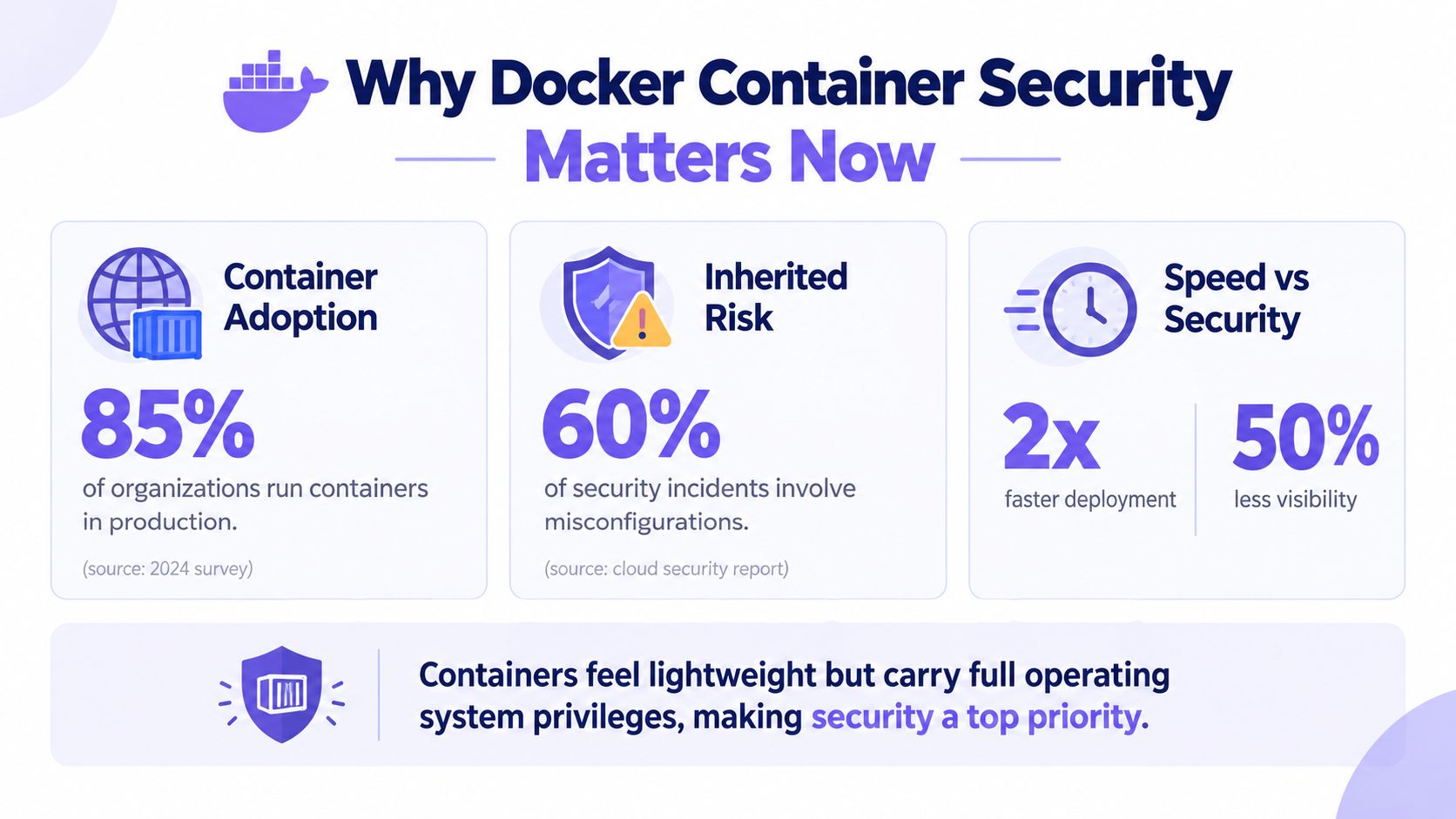
A 2026 crawl of Docker Hub found known package vulnerabilities in 96.3% of the highest-exposure repositories, critical vulnerabilities in 93.4%, and at least one CIS Docker Benchmark misconfiguration in 98.0% of them. The scan covered 52,895 repositories representing 84.7% of all recorded pulls, so this isn't an edge-case problem limited to obscure images. It shows why Docker container security has to begin before an image reaches a registry, not after deployment fails a vulnerability scan. (2026 Docker Hub crawl)
A container feels small because it starts quickly and packages an application neatly. Security teams, however, still need to account for its libraries, operating-system packages, runtime permissions, host kernel, network access, secrets, and delivery pipeline. The practical question isn't only “Does this image contain a CVE?” It's “What risk did we allow into the image, what can the process do at runtime, and can we prove why it was approved?”
Introduction Why Docker Container Security Matters Now
Docker Hub's scale makes inherited risk difficult to contain. The 2026 crawl recorded 12,716,568 repositories and 663.8 billion cumulative pulls before focusing on the repositories with the greatest exposure. When a commonly used base image contains a vulnerable package, every downstream image that inherits it can carry the same weakness until someone rebuilds and redeploys it. (2026 Docker Hub crawl)
That propagation is the part developers often underestimate. A Dockerfile may contain only application code, but its FROM line imports an entire software starting point. The image can include system libraries, package managers, language runtimes, certificates, shell utilities, and configuration files that the application team never wrote and may not regularly inspect.
A 2017 analysis of 356,218 Docker Hub images found that official and community images contained more than 180 vulnerabilities on average when all versions were considered. Even the latest official images averaged more than 70 vulnerabilities, and more than 80% of both image types had at least one high-severity vulnerability. Many images had gone unupdated for hundreds of days, demonstrating how quickly stale foundations accumulate security debt. (Docker Hub security study)
Host security and container security overlap, but they aren't interchangeable. A hardened host can still run an image with unnecessary packages, excessive privileges, or exposed secrets. Conversely, a carefully built image can still become dangerous if the runtime grants it host namespaces, broad Linux capabilities, or unrestricted filesystem access.
Practical rule: Treat the container lifecycle as one security boundary. Build-time choices, runtime controls, orchestration policy, and operational monitoring must reinforce one another.
A useful design principle is to prevent security debt at its source. An application security posture approach helps teams connect architecture decisions, code changes, and deployment controls instead of treating image scanning as the only security activity.
How Docker Containers Work and Where Isolation Breaks
Think of a host as an apartment building. Each container is an apartment with its own front door, furniture, and room numbering, but all apartments still share the building's foundation, plumbing, and electrical systems. The front doors are useful boundaries, yet they don't turn each apartment into a separate building.
Docker uses Linux kernel features to create those boundaries. Namespaces give processes separate views of resources such as processes, networking, mounts, and inter-process communication. cgroups limit and account for resource consumption, which helps prevent one workload from exhausting the host's CPU or memory. Capabilities divide root-like powers into smaller permissions, so a process doesn't automatically receive every administrative ability.
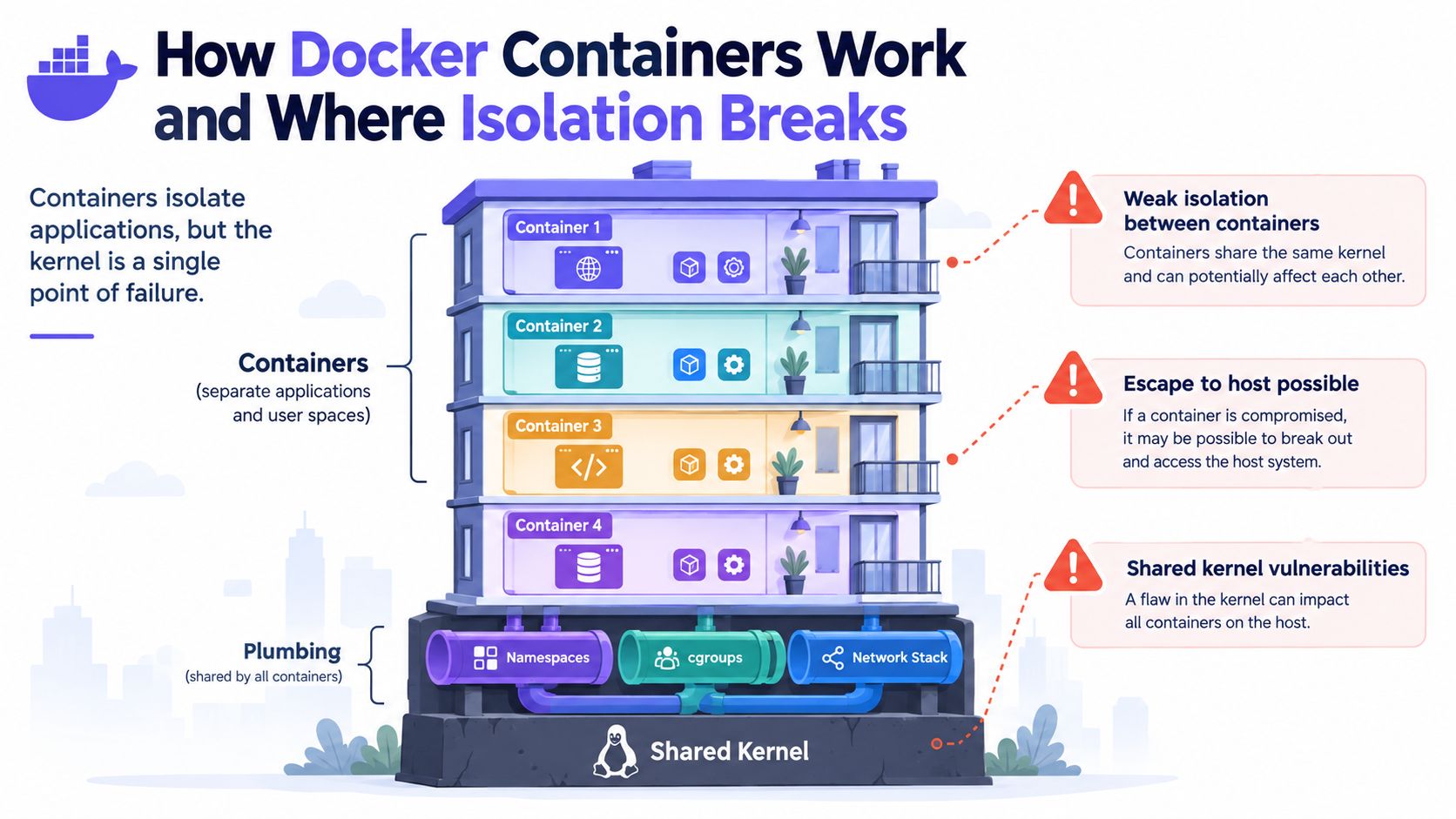
The critical detail is that containers share the host kernel. A virtual machine normally presents a guest operating system with a separate kernel boundary. A container instead asks the host kernel to perform operations on its behalf. That model is efficient, but a kernel vulnerability, runtime weakness, or dangerous configuration can turn an application compromise into a host-level problem.
Where the apartment doors fail
Isolation weakens when a container receives access intended for the host. Sharing the host's IPC namespace exposes host inter-process communication to code inside the container. Sharing the host's process namespace exposes host process visibility, which breaks the expectation that a container can see only its own workload.
Host filesystem mounts create another direct path. A writable mount containing sensitive host files, runtime sockets, or administrative material can let a compromised process influence resources outside its intended apartment. Privileged mode is similarly risky because it grants a broad collection of powers rather than one narrowly justified permission.
The threat modeling process is useful here because it makes the boundary explicit. Ask what the application needs to read, write, call, and communicate with, then identify what happens if an attacker controls that process.
A container is isolated by configuration, not by appearance. A small image can still have a large blast radius.
The safest assumption is that the process will eventually encounter hostile input or a compromised dependency. Namespaces reduce what it can observe, cgroups constrain resource abuse, and capabilities limit privileged operations. None of those controls should be treated as a complete replacement for the others.
Securing Container Images Before They Ever Run
Image security works best as a prevention discipline. Scanning tells you what arrived in the artifact, but it doesn't automatically stop teams from selecting a bloated or poorly maintained foundation in the first place. Recent industry coverage emphasizes that scanning is only one layer, with SBOMs, hardened images, secure starting points, and governance becoming more important for traceability and supply-chain control. (Container industry coverage)
Start with a deliberate foundation
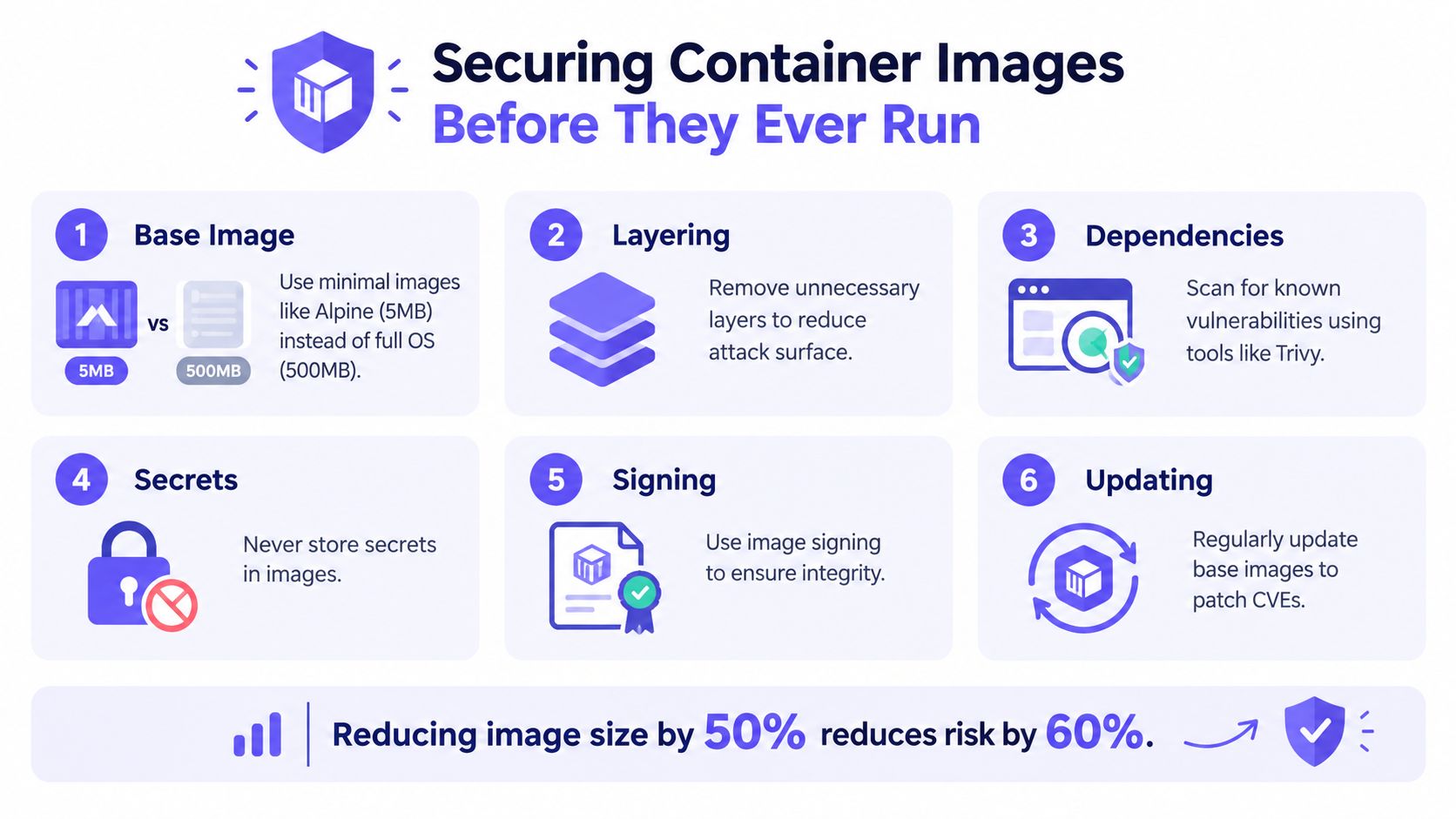
Choose a trusted base image maintained for your language and operating environment. Minimal images, including distroless options or Alpine where compatibility permits, remove tools that the application doesn't need. Smaller isn't automatically safer, though. Validate compatibility, patch availability, debugging requirements, and the image publisher's maintenance process before standardizing it.
Pin the base image by digest rather than relying only on a mutable tag. A tag such as latest can point to different content over time, while a digest identifies the exact artifact used in a build. Record the selected digest in the repository and update it through a reviewable process.
Use multi-stage builds to keep compilers, package managers, test utilities, and source material out of the production image. The build stage can contain everything needed to compile the application, while the final stage receives only the runtime files and certificates required to execute it.
Make the artifact explainable
Generate an SBOM, or software bill of materials, during the build. It should identify direct and transitive packages so engineers can answer which applications inherit a vulnerable component. Pair the SBOM with image signing and provenance attestations, then make the registry and deployment platform verify them.
Never place credentials, private keys, cloud tokens, or environment-specific secrets in an image layer. Deleting a secret in a later Dockerfile instruction doesn't reliably erase it from the image history. Use a secret manager or the CI system's protected secret mechanism, and inject values at the point of use.
A composition analysis process can connect package findings to ownership and remediation decisions. Tools such as Trivy can scan images, but the useful outcome isn't a growing list of alerts. The useful outcome is a controlled decision about whether to rebuild, replace the base, accept a documented exception, or block promotion.
If old or unused images are consuming storage and creating operational confusion, this guide to fix server sluggishness with Docker images offers practical cleanup context. Cleanup won't replace secure builds, but it can reduce stale artifacts that teams might accidentally deploy.
A repeatable build policy should therefore require:
- Approved foundations: Build only from maintained, reviewed sources.
- Pinned content: Record immutable image digests and update them intentionally.
- Lean runtime layers: Exclude compilers, shells, package caches, and test tools unless the service needs them.
- Machine-readable inventory: Produce an SBOM for every releasable image.
- Verified provenance: Sign artifacts and retain build attestations.
- Continuous refresh: Rebuild when the base or a transitive dependency requires remediation.
The objective is not an image that merely passes today's scan. It's an image whose contents, origin, ownership, and update path remain understandable tomorrow. For a deeper view of dependency risk, use software composition analysis as part of the broader build-control process.
Hardening the Docker Runtime with Kernel Controls
A hardened image still needs a constrained runtime. The guiding philosophy is deny by default. Start with the smallest permission set, then add a narrowly documented exception when the application proves it needs one.
Remove privilege before adding it
Linux capabilities divide traditional root authority into separate powers. Drop all capabilities where practical, then add only the specific capability a process requires. A web service that only binds to an unprivileged port shouldn't receive administrative networking powers. A process that doesn't alter kernel settings shouldn't receive system-control capabilities.
Keep Docker's default seccomp profile enabled. Seccomp filters system calls, which limits the kernel operations available to a compromised process. Disabling it or running a container unconfined removes a key barrier against kernel exploitation and breakout attempts. (Runtime security guidance)
AppArmor or SELinux adds another policy layer. These controls describe which files, operations, and transitions a process may access, even when the process has more ordinary filesystem permissions. Select an enforcing profile, test it with representative workloads, and treat profile changes as code-reviewed security decisions rather than emergency command-line fixes.
Close persistence paths
Make the container's root filesystem read-only whenever the application supports it. A read-only root blocks many post-compromise persistence techniques and forces the team to identify the few directories that need writes. Mount those locations explicitly, with appropriate permissions and lifecycle expectations.
User namespace remapping further reduces the consequences of an escape. The CIS Docker Benchmark recommends mapping container-root to an unprivileged host UID range, so root inside the container isn't automatically root on the host. The benchmark also warns against sharing host IPC and process namespaces because those settings expose host communication and process visibility. (CIS Docker Community Edition Benchmark)
Resource limits belong in the same conversation. CPU, memory, process-count, and filesystem limits don't prevent every exploit, but they constrain denial-of-service behavior and make abnormal activity easier to detect. Rootless Docker can reduce daemon and host privilege exposure where the workload and networking model support it.
Runtime design rule: Don't ask which flags make a container “secure.” Ask which host resource each permission exposes, then remove every permission the service can't justify.
Test the hardened configuration with application startup, health checks, logging, file writes, network calls, and graceful shutdown. A control that exists only in a development compose file isn't protection. Verify the deployed configuration, inspect effective capabilities and profiles, and alert when a workload runs with privileged settings or an unexpected namespace mode.
Kubernetes and Orchestration Security Essentials
Kubernetes turns container decisions into cluster policy. That creates influence, but it also scales mistakes. A privileged pod, unrestricted service account, or broad host mount can affect more than one workload because the scheduler places many services on shared nodes and control planes coordinate the entire environment.
Start with Pod Security Standards and enforce them through the cluster's admission path. Workloads should run as non-root where possible, avoid privileged mode, prohibit unnecessary host namespaces, and reject host filesystem mounts unless an infrastructure service has a documented reason. Admission controllers provide an enforcement point before a manifest becomes a running pod.
Keep one compromised workload contained
RBAC should grant each service account only the verbs and resources it needs. A service that reads its own configuration doesn't need permission to list secrets across namespaces. Separate application identities, operator identities, and automation identities, then review bindings for inherited wildcard access.
Network segmentation limits lateral movement. Define NetworkPolicies that allow expected application flows and deny unneeded connections. A frontend may need to reach an API, while neither component should communicate freely with databases, metadata services, or administrative endpoints. Make policy changes part of application ownership and deployment review.
Secrets require special handling. Kubernetes Secret objects provide a delivery mechanism, not a complete governance strategy. Limit who can read them, encrypt storage according to the cluster's operating model, avoid exposing them in logs or manifests, and consider an external secrets manager for centralized rotation and audit.
Protect the control plane and delivery path
Restrict access to the Kubernetes API, dashboards, and node management interfaces. Keep the control plane and worker nodes patched, use authenticated image registries, and require signed or approved images through admission policy. Logging should capture authentication, authorization, workload creation, policy decisions, and significant changes to cluster configuration.
A useful comparison is simple:
| Permissive pattern | Hardened pattern |
|---|---|
| Privileged pods accepted by default | Admission rejects privileged workloads unless explicitly approved |
| Broad service-account permissions | RBAC grants resource-specific access |
| Any pod can reach any service | NetworkPolicies define allowed paths |
| Mutable or unknown images | Approved, scanned, signed images are required |
| Host mounts added for convenience | Host access is restricted to documented infrastructure workloads |
Kubernetes security isn't just Docker security repeated at larger scale. Docker controls protect a process and its host boundary. Orchestration controls govern identity, scheduling, admission, networking, secrets, and cluster-wide blast radius.
Supply Chain and CI/CD Security for Container Workflows
The strongest pipeline doesn't ask only whether an image contains a known vulnerability. It asks whether the team can identify its contents, verify its origin, explain its approval, and prevent an unsafe change from reaching deployment.
That distinction matters more as AI-assisted coding and agentic workflows accelerate edits. An assistant can introduce an unsafe default, select a questionable dependency, expose a secret in generated configuration, or alter a container permission without understanding the deployment context. Human review remains important, but manual review alone can struggle when changes arrive faster than the team's security context is refreshed. Docker's 2025 security coverage describes this shift toward workflow-native governance and notes fragmented use of tools, including SonarQube at 11%, Dependabot at 8%, and Snyk and AWS Security Hub at 7%. (Docker Black Hat 2025 coverage)
Place controls where decisions happen
Generate an SBOM during image creation, attach it to the exact digest, and retain it with the build record. Use Cosign or an equivalent signing workflow to verify that the registry artifact came from an approved build system. Add provenance attestations that identify the source revision, build process, and relevant dependencies.
Policy-as-Code turns expectations into repeatable checks. A pull request policy can reject a Dockerfile that uses an unapproved base, adds a secret, runs as root without justification, disables seccomp, or introduces a privileged deployment setting. The deployment policy can then verify that the promoted image is the same signed artifact reviewed in source control.
| Pipeline stage | Key control | Prevents what |
|---|---|---|
| Planning | Threat model and security requirements | Missing abuse cases and unowned decisions |
| Coding | Secure defaults, secret detection, dependency review | Unsafe generated code and accidental credential exposure |
| Pull request | Policy-as-Code and traceable approval | Unreviewed container privilege or configuration changes |
| Build | Pinned bases, SBOM generation, provenance | Unclear contents and unverified artifact origin |
| Registry | Access controls, signing, retention rules | Unauthorized publishing and artifact substitution |
| Deployment | Admission policy and digest verification | Unapproved or altered images reaching runtime |
| Operation | Runtime monitoring and rebuild triggers | Drift, unusual behavior, and stale dependencies |
Make governance continuous
Security context should travel with the change. If an application adds a new outbound integration, the threat model should capture the destination and data flow. If an AI agent changes the Dockerfile, the same policy should evaluate the resulting privileges and base image. If an exception is granted, store its owner, reason, scope, and expiry with the approval record.
This approach reduces dependence on disconnected point tools. Scanners still matter, but they become evidence within a decision system rather than the entire system. The team can prioritize exploitable exposure, understand ownership through the SBOM, and block risky changes before they become deployed security debt.
Putting Docker Container Security into Practice
Start with controls that reduce exposure without requiring a platform redesign. Run the application as a non-root user, remove unnecessary packages and capabilities, keep seccomp enabled, apply an enforcing AppArmor or SELinux policy, and make the root filesystem read-only where the service permits it.
Then establish image and pipeline discipline. Use approved, pinned base images, generate an SBOM, sign the resulting artifact, and require deployment by immutable digest. Add pull-request policy checks for secrets, privileged settings, host namespaces, unsafe mounts, and undocumented exceptions.
A practical verification checklist should answer these questions:
- Image origin: Can the team identify who built the image and which source revision produced it?
- Image contents: Is an SBOM attached to the exact deployed digest?
- Runtime identity: Does the process run without unnecessary root or Linux capabilities?
- Kernel boundary: Are seccomp and AppArmor or SELinux enforcing?
- Filesystem behavior: Is the root filesystem read-only, with explicit writable paths?
- Namespace safety: Does the workload avoid host IPC and process namespaces?
- Cluster access: Are RBAC, NetworkPolicies, secrets access, and admission rules restrictive?
- Change traceability: Can reviewers connect an exception or approval to the code and deployment that use it?
Finally, keep threat modeling alive as the system changes. New dependencies, generated code, integrations, and deployment settings can invalidate yesterday's assumptions. Container security becomes durable when policy enforcement, implementation verification, and operational evidence stay connected from the first Dockerfile commit through production.
DevArmor helps teams maintain a living security context across planning, coding, pull requests, and deployment, including policy enforcement and guardrails for AI-assisted development. Visit DevArmor to connect continuous threat modeling and traceable security decisions with the container workflows your engineering team already uses.
Related reading
- Enterprise Application Security: Key Strategies for 2026 — threat modeling, policy enforcement, and compliance at enterprise scale.
- Security by Default: Principles and Practical Guardrails — practical defaults that reduce attack surface from day one.
- 8 Policy as Code Examples for Secure Delivery — concrete examples for PR gates, infrastructure, Kubernetes, and compliance.
Table of Contents
Subscribe