What Is the Difference Between Verification and Validation
 Reza Khosravi
Table of Contents
A feature can pass every check in the pull request and still disappoint the people who use it. The code compiles, the unit tests pass, the security scanner reports no blocking issue, and the release meets the written acceptance criteria. After deployment, users discover that the workflow doesn't match how they work, an important edge case breaks the process, or the feature solves a problem they never had.
That situation captures the practical answer to what is the difference between verification and validation. Verification checks whether the team built the product according to its specified requirements. Validation checks whether the product serves its intended purpose in realistic conditions. Both are forms of quality control, but they protect against different failures.
For product and AppSec teams, the distinction also maps neatly onto the modern software delivery lifecycle. Design reviews verify intent, code checks verify implementation, and deployment exercises validate behavior in context. Policy-as-Code can automate much of the verification work, while validation still depends on representative use cases, operational evidence, and human judgment.
Why Building Right Is Not the Same as Building the Right Thing
A product team adds an export feature after several customers request better reporting. The team writes a clear ticket, agrees on the fields, designs the API, reviews the pull request, and runs automated tests. Every test passes because the implementation matches the ticket.
After release, customers still struggle. They needed scheduled exports for finance workflows, but the team delivered a manual download. The feature was built correctly against the written requirement, yet the requirement captured the wrong interpretation of the user's need. Verification succeeded. Validation exposed the gap.
Two different risks hide behind one release
Verification asks whether the work conforms to an agreed specification. It examines requirements, architecture, code, configuration, and test artifacts. A reviewer might confirm that an authorization check appears on every protected endpoint, that a database field uses the intended type, or that a change follows an approved design decision.
Validation asks whether the delivered system works for its intended users and context. A product manager might observe a customer completing the workflow. An operations team might run the feature with production-like data and failure conditions. A security engineer might test whether the control reduces the threat it was designed to address.
Confusing the two creates two kinds of waste. If verification is weak, defects spread from an ambiguous design into code, tests, and deployment artifacts. If validation is weak, the team can spend considerable effort polishing a technically conformant feature that doesn't solve the operational problem.
Security and compliance make the distinction harder to ignore. A design can specify tenant isolation, and code review can verify that the implementation includes the expected authorization logic. Validation still needs to establish that users from different tenants can't access one another's data during realistic workflows, including unusual account states and integration paths.
Practical rule: Passing a requirement check doesn't prove that the requirement describes the right outcome.
Teams building a reliable quality practice often benefit from separating quality assurance from the individual tests used to check a release. The distinction between preventing process failures and inspecting outputs is explored in this resource on הבטחת איכות בתוכנה. That broader perspective helps product and security teams treat verification and validation as connected controls rather than interchangeable labels.
What Verification and Validation Actually Mean
The standards definitions are precise, but the underlying idea is easy to remember.
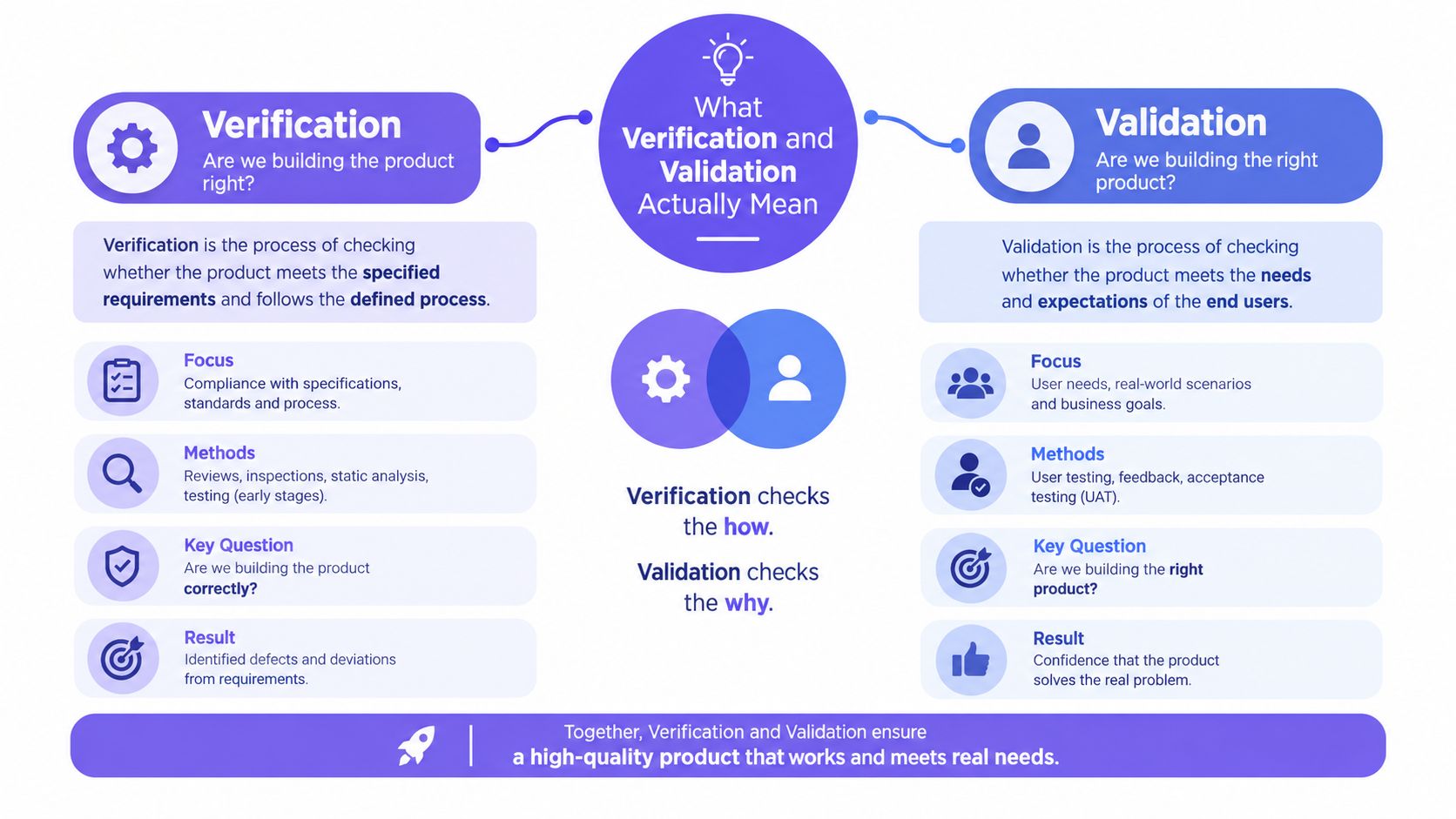
Verification is confirmation by objective evidence that specified requirements have been fulfilled. In plain language, it asks: Did we build it right according to the requirements, design, and constraints we approved?
Validation is confirmation by objective evidence that the requirements for a specific intended use or application have been fulfilled. In plain language, it asks: Did we build the right product for the user's real need and operating context?
The words “specified” and “intended use” carry the important difference. A specification is an artifact. It might be a ticket, an architecture decision, a security requirement, an API contract, or a policy. Intended use is contextual. It includes the user, workflow, environment, data, constraints, and outcome the system must support.
The blueprint and the lived-in house
Think of a house under construction. Verification checks whether the builders followed the blueprint: the walls have the specified dimensions, the wiring follows the design, and the materials match the plan. Validation happens when people use the finished house. Can they move through the rooms comfortably? Does the kitchen support how they cook? Can the heating system maintain a suitable environment?
A house can conform to its blueprint and still have a poorly placed light switch. Software works the same way. A form can validate every field exactly as specified, yet frustrate users because the workflow asks for information they don't have at that point.
The distinction has been formalized for decades. IEEE published a system and software verification and validation standard in 1986, with ANSI approval on 1987-02-10 and publication on 1986-11-14, demonstrating that the two activities were treated as separate quality controls well before modern DevOps practices (IEEE 1012 standards history). IEEE 1012 was updated in 2004, 2012, 2016, and 2024, which also shows that the concepts continue to evolve across software and systems engineering.
A simple test for choosing the term
Ask what the evidence is being compared against.
- A requirement, design, or policy: You're performing verification.
- A realistic user workflow or intended application: You're performing validation.
- A static artifact or implementation rule: Verification is usually the better description.
- A running system under representative conditions: Validation is usually involved.
This doesn't mean every automated test is validation or every review is verification. The activity's purpose matters more than the tool. A runtime test can verify that an API matches its contract, while a design review can support validation by examining whether the proposed workflow addresses the intended use. For a practical treatment of the distinction, see these practical insights from GoReplay.
How Verification and Validation Compare Across the Lifecycle
The clearest comparison is to place both activities beside the artifacts and decisions they examine.
| Criterion | Verification | Validation |
|---|---|---|
| Primary purpose | Confirm conformance with specified requirements | Confirm fitness for intended use |
| Core question | Did we build it right? | Did we build the right thing? |
| Main inputs | Requirements, designs, code, policies, models, and test specifications | User needs, acceptance criteria, realistic data, workflows, and operating conditions |
| Typical methods | Inspections, walkthroughs, design analysis, static analysis, code review, and contract checks | User acceptance testing, integration exercises, scenario testing, operational trials, and behavior evaluation |
| Timing | Throughout the lifecycle, often before execution | When a representative system or workflow can be exercised |
| Evidence | Traceable records showing conformance to defined artifacts | Results showing that the system performs its intended function in context |
| Common failure found | Omission, inconsistency, incorrect implementation, or policy violation | Workflow mismatch, integration gap, misunderstood need, or unsuitable behavior |
| Primary risk reduced | Defect escape from implementing requirements incorrectly | Business, operational, or safety risk from building the wrong product |
Why the evidence isn't interchangeable
A pull request approval can show that a developer implemented an approved authorization pattern. It doesn't, by itself, prove that the authorization model supports every role and workflow. A user acceptance result can show that a customer completed a process, but it doesn't prove that the code follows the organization's secure implementation policy.
In audit-heavy environments, this separation matters because the evidence has different purposes. Verification records should connect requirements to design and implementation artifacts. Validation records should explain the intended use, the conditions tested, the acceptance criteria, and the observed outcome.
Regulated software illustrates the difference clearly. IEC and ISO guidance describes verification as checking specifications and requirements through tests or reviews of artifacts such as specifications, models, or pseudocode. Validation checks whether the software satisfies its intended use. For medical-device software, IEC 62304 similarly distinguishes examination of activity results for conformity from validation for intended use (ISO/IEC guidance).
Use implementation verification when the immediate question is whether approved security design decisions are reflected in code and deployment changes. Keep a separate validation record for whether the resulting system behaves safely and usefully in the conditions that matter.
Why One Happens Without Running the Product and the Other Does Not
Verification can often begin before the product exists. A security engineer can inspect a data-flow diagram, compare an architecture decision with requirements, review pseudocode, or analyze a proposed control without executing the complete system. Static analysis and policy checks extend the same principle into the coding workflow.
Validation usually needs a running system or a representative executable slice. The team must exercise a workflow, observe behavior, and compare the result with the intended use. This is why validation can't be reduced to checking whether files contain the right patterns.
What static verification catches early
Suppose a design requires sensitive records to remain within a designated trust boundary. A verification review can inspect the architecture and identify an external data transfer that violates the requirement before implementation. A code review can then check whether the approved storage and access patterns appear in the change.
These activities are valuable because they catch problems while the affected artifact is still easy to change. Verification can reveal:
- Inconsistencies: The API design and threat model describe different authorization assumptions.
- Omissions: A required audit event has no corresponding implementation task.
- Constraint violations: A dependency or configuration change conflicts with an approved security policy.
- Traceability gaps: The pull request cannot be connected to a requirement or design decision.
The engineering effect is straightforward. Finding a mismatch in a document or pull request prevents downstream work from building on it. Teams still need to fix the issue, but they avoid propagating the error through integration and release activities.
What execution reveals
A design may correctly describe role-based access, and the code may contain the expected checks. Validation can still uncover a workflow failure: a delegated user loses access during a handoff, a background job runs under the wrong identity, or an integration bypasses the normal authorization path.
Those problems emerge because validation examines behavior under conditions that resemble actual use. The relevant evidence might include a complete user journey, realistic data relationships, service-to-service interactions, failure recovery, and operational observability.
The Scrum.org discussion of doing the right thing and doing it right captures the practical relationship. Verification helps prevent incorrect implementation of a specification, while validation tests whether the specification and resulting product support the outcome people need.
A static check can prove that a control exists. Only contextual execution can show how that control behaves when people and systems use it.
Real World Examples From Design to Code to Deployment
Consider a team adding file sharing to a collaboration platform. The feature involves private files, invited users, inherited permissions, malware scanning, and an external notification service. The same security objective appears at several lifecycle points, but each point calls for a different kind of evidence.
Design review verifies the intended control
The product manager describes the user workflow in Jira. The architect records that private files require explicit authorization, that notification payloads must exclude file contents, and that malware scanning must occur before a recipient can download a file.
The security reviewer verifies that the threat model and architecture address those stated requirements. The review might identify an untrusted callback, an unclear ownership rule, or a missing decision about expired invitations. A useful threat modeling process gives teams a way to document those decisions while the design is still changing.
At this point, nobody has proved that the final feature works. The team has verified that the proposed design accounts for the requirements and known security constraints.
Code review verifies implementation
A developer opens a pull request. The reviewer checks the authorization middleware, storage configuration, notification payload, and scan-result handling against the approved design. Automated Policy-as-Code can check repository and infrastructure changes for required controls, while static analysis can flag unsafe implementation patterns.
The evidence should be traceable. A reviewer should be able to connect the requirement to the design decision, then to the relevant code and policy result. If an AI coding assistant generated part of the change, the same standard applies. Generated code still needs verification against the approved intent and security policy.
Deployment validation tests the real workflow
In staging, the team creates accounts with different roles, shares files across groups, delays a malware scan, revokes an invitation, and exercises the notification path. Testers observe whether users can complete legitimate tasks and whether unauthorized paths remain blocked.
Production validation can use carefully controlled releases and feedback from real workflows. The question changes from “Does this pull request contain the required check?” to “Can the intended users safely share and retrieve files under the conditions they face?”
For AppSec, this is the important distinction between implementing a mitigation and demonstrating that the mitigation works in context. A code pattern can satisfy verification while a business workflow still exposes an unintended path.
How to Instrument Both Without Slowing Delivery
Fast teams don't need fewer controls. They need controls placed where the work already happens and evidence captured automatically.
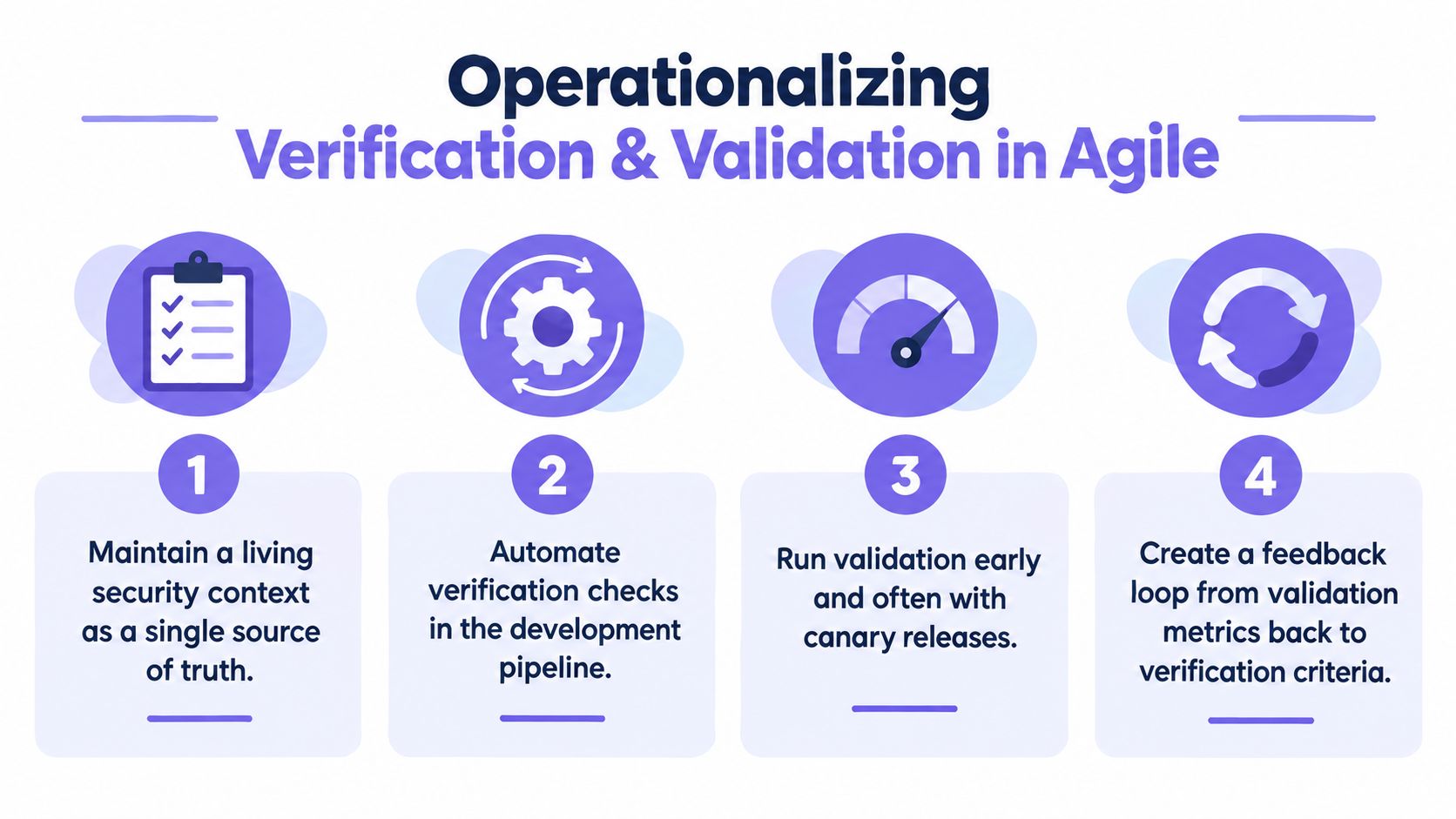
Start with a living security context. Keep requirements, threat assumptions, architecture decisions, repositories, tickets, and deployment metadata connected as they change. A static document becomes misleading when the code and product behavior move beyond it.
Put verification in the development path
Verification works well as a set of small, repeatable checks:
- Review design decisions before implementation. Link a threat model or security requirement to the ticket and architecture artifact.
- Check changes at pull request time. Use code review, static analysis, dependency rules, infrastructure checks, and Policy-as-Code.
- Preserve the result. Store the rule outcome, reviewer decision, affected commit, and requirement reference.
- Block only defined violations. A merge gate should enforce explicit policies, not turn every uncertain scanner signal into a delivery stop.
This approach gives developers feedback in GitHub, an IDE, or another existing workflow instead of requiring a separate security meeting for every change. It also creates a clear trail for later review.
Keep validation close to real use
Validation needs a different design. Define representative scenarios before release, including normal workflows, permissions changes, integration failures, unusual data, and operational recovery. Product managers and support teams should participate because they understand the user's actual goal better than a code-only test suite does.
For AI-assisted development, treat generated or modified code as a change that needs both controls. Verification can examine the generated implementation, policies, and tests. Validation should focus on whether the modified behavior still works for the intended users, especially when an agent changes a shared component or alters a model interaction.
The FDA's AI materials distinguish verification of code and calculations from validation of model behavior for its intended context of use, and emphasize lifecycle evidence rather than a one-time pass or fail conclusion (FDA AI credibility guidance). Related FDA materials also separate performance testing, post-modification verification, and validation under changed conditions (FDA change-management materials).
Automation boundary: Automate conformance checks aggressively. Keep people responsible for deciding whether observed behavior represents the intended product outcome.
DevArmor is one example of a platform that connects continuous threat modeling and security design decisions to code review, with Policy-as-Code enforcement and traceable implementation verification. Teams can also assemble similar controls from Jira, GitHub Actions, IDE checks, infrastructure policy tools, and release testing. The important design choice is to connect the evidence rather than collect unrelated scan results, as described in this overview of application security automation.
Bringing Verification and Validation Together for Continuous Assurance
Verification and validation form a loop, not a choice between two testing camps.
Verification keeps the implementation aligned with requirements, design decisions, and policies. It reduces the chance that developers ship a control incorrectly or allow specification drift to reach deployment. Validation tests whether the resulting product works for its intended users, data, integrations, and operational conditions. It reduces the chance that the team ships something technically correct but commercially, operationally, or securely wrong.
Ask both questions throughout the lifecycle:
- Design: Does the proposed architecture satisfy the stated security and product requirements?
- Code: Does the implementation conform to the approved design and policy?
- Deployment: Does the running system behave correctly in realistic workflows?
- Change: Does the evidence still apply after the system, model, dependency, or user context changes?
The strongest teams connect these answers. A validation failure should update requirements or design assumptions. A changed design should create new verification work. A new implementation should carry traceability back to the decision that authorized it.
That discipline supports broader operational excellence in DevOps because delivery teams can move quickly without treating quality, security, and user outcomes as separate afterthoughts.
DevArmor helps teams maintain a living security context across planning, design, coding, and deployment, then turns approved security decisions into traceable verification checks for pull requests. Visit DevArmor to see how continuous threat modeling, Policy-as-Code, and implementation verification can support safer AI-assisted delivery.
Table of Contents
Subscribe