
Secure Code Scanning Explained: SAST, DAST and SCA
 Reza Khosravi
Table of Contents
Your pull request is ready. The build is green, reviewers approve, and then the security check adds forty findings. Some look serious, some point at test code, and nobody knows which ones should stop the merge.
That's the normal starting point for secure code scanning. The tools aren't broken. Teams usually run them without a shared rule for what each scanner can see, what it misses, and what confidence earns a block. This guide builds that rule step by step, starting with the three scanner types, then how findings form, how you verify them, and how you enforce only the ones that matter.
Three Kinds of Secure Code Scanning at a Glance
Say your login form passes one scanner and fails another. The static tool finds no injection in the handler, so the pull request looks clean. The dynamic tool later reports that the deployed login page sends no protection headers and accepts requests without the expected checks.
Both tools can be right because they're inspecting different layers. One reads code before it runs, one probes the running app from outside, and one checks the libraries you imported. Confusing those jobs is how teams buy a second tool that addresses the same gap while leaving another gap open.
Secure code scanning types by scope and blind spot
| Type | What it inspects | When it runs | Typical findings | Blind spot |
|---|---|---|---|---|
| SAST | Source code and build artifacts, without running the app | IDE and every pull request | SQL injection, cross-site scripting, hardcoded secrets | Runtime configuration and business logic |
| DAST | Running application, tested from outside | Staging deploys and nightly builds | Missing authentication, weak headers, exposed endpoints | Code paths that test traffic never reaches |
| SCA | Third-party libraries and their versions | Every build and lockfile change | Known CVEs, license conflicts | Flaws in custom code |
Reading the Table Like a Triage List
SAST is your earliest feedback because it doesn't need a deployed app. A developer can fix a query construction problem in the editor, before review. But it can't tell you how the production server is configured or whether a business rule makes a syntactically safe operation dangerous.
DAST sees what an external caller sees, including routing, headers, and authentication behavior in a real deployment. Its limit is coverage. If your test account never opens an admin route or submits a particular form, the scanner won't exercise that code either.
SCA answers a narrower question: which third-party components are present, and are any known to be vulnerable or badly licensed. A deep software composition analysis check still needs a reachability check before you treat a result as urgent. A vulnerable library matters most when your code imports and invokes the affected function. If the vulnerable function never runs, you still upgrade on a schedule, but you don't block an urgent release the same way.
First decision: Name the gap you're closing first. Unsafe custom code points to SAST, exposed deployed behavior to DAST, and risky dependencies to SCA.
No single type covers every risk. Start with the layer where your team currently has no evidence at all.
How SAST Follows Data From Source to Sink
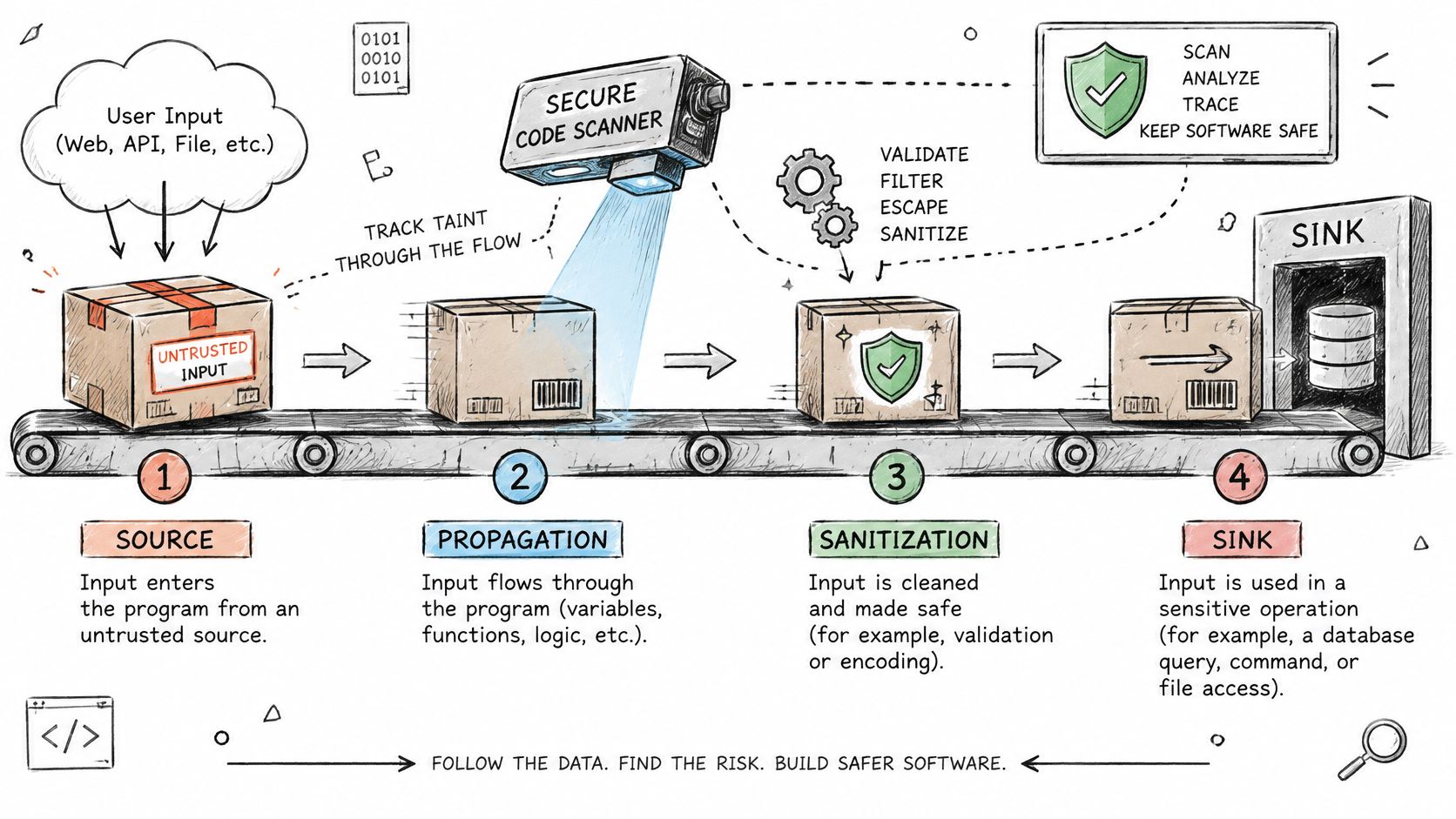
Think of untrusted input as a parcel that enters your program. SAST doesn't just check whether the parcel exists. It tries to follow the parcel through the building until it either gets inspected and made safe or reaches a sensitive room.
That tracking has four parts, and the OWASP Code Review Guide describes this source-to-sink model as tracing whether attacker-controlled input reaches a security-sensitive operation across methods, classes, or files. Sources are entry points such as a request parameter, uploaded file, header, or message field. Propagation is each hop through variables, helper functions, and files. Sanitizers make a value safe for a specific use, such as parameterized queries or context-specific output encoding. Sinks are sensitive operations such as a database query, shell command, file path, or HTML response.
One Username Through the Code
Say a login request contains a username. Your controller reads it and passes it to a helper that only trims whitespace. Another method concatenates that value into a SQL string, and the database call executes the string. A data-flow scanner reports the path because trimming whitespace doesn't neutralize SQL syntax, and no sanitizer sits between the source and the sink.
Contrast that with a simple pattern matcher. It might flag every call to the query function, even when the argument is a fixed internal string with no user input. It might also miss the login flaw if the dangerous concatenation happens two helpers away. Data-flow analysis is stronger because it makes a claim about a connected path.
Where the Trail Breaks
Coverage is conditional. Reflection, generated code, dynamic configuration, unsupported frameworks, and complex cross-method flows can prevent the analyzer from resolving a path. A clean scan therefore doesn't prove a flow is safe, and a finding isn't automatically a vulnerability.
Practical teams record the conditions behind each scan so reviewers can judge that uncertainty. Keep the scan scope, excluded files, language versions, and build configuration with the result. Document what each rule needs, such as taint propagation, framework modeling, or control-flow sensitivity.
When you read a finding, check the source line, follow each hop, inspect every alleged sanitizer, and finish at the sink line. Ask whether an attacker controls the starting value and whether that same value can still do harm at the end. A SAST finding is a claim about a path, not a verdict about a line.
Telling Real Findings From False Positives
The first weeks after rollout usually produce a backlog no one planned for. Hundreds of findings land at once, and teams pick one of two bad defaults. They ignore the whole queue because it's too noisy, or they block everything and teach developers to seek exemptions.
You need a confirmation habit first and a measurement habit second. Start with the patterns that most often mislead reviewers.
False-positive causes and how to confirm each finding
| Finding pattern | Common false-positive cause | How to confirm |
|---|---|---|
| User input reaches a query through a helper function | Sanitizer inside the helper is not modeled | Trace the call path and check the sanitizer by hand |
| Hardcoded secret in a test fixture | Dummy value used only in tests or docs | Check whether the value appears in production config |
| Unsafe deserialization in unreachable code | Dead code or a disabled feature flag | Confirm the call site is reachable from an entry point |
| Vulnerable dependency in a dev-only package | Package excluded from the production build | Check the production dependency tree |
| Outdated library with no exploitable path | Vulnerable function is never called | Check whether the affected function is imported and invoked |
Triage in a Fixed Order
- Confirm reachability first: Trace backward from the sink to a real entry point. If no external caller, job, or trusted internal path can reach it, record why and lower the priority.
- Check sanitizers by hand: Open the helper instead of trusting its name. A function called
cleanInputmay only trim spaces, while a well-used framework encoder may be safe but unknown to the scanner. - Rank by exploitability: Use the scanner label as a hint, not the decision. A medium label on an internet-facing path can outrank a high label in dead code.
Our guide to false positives and false negatives goes deeper on disposition language, but the core discipline is simple. Every suppression needs a reason, an owner, and an expiry date.
Measure the Scanner, Not Just the Code
The OWASP Benchmark supplies runnable applications containing thousands of intentionally exploitable test cases mapped to specific CWEs, with scoring for accuracy, coverage, and speed. Because its cases distinguish true positives from false positives, you can measure performance per vulnerability class instead of treating all findings as equal.
Don't stop at a public score. Benchmarks range from tens to tens of thousands of samples, use uneven vulnerability distributions, and may not represent your production apps. Build a three-part evaluation set with the standard benchmark for repeatable regression testing, an internal corpus in your languages and frameworks, and production-derived cases verified by security engineers.
Track precision, recall, time per change, analysis failures, and unresolved findings by CWE and repository type. Re-run the suite after rule, model, compiler, or framework upgrades. A rule earns blocking power only after it performs well on both public cases and code that resembles yours.
Setting Blocking Policies Without Drowning in Alerts
Scanners produce volume. Enforcement needs precision. If every alert blocks a merge, developers won't become more careful, they'll become faster at suppressing alerts.
The better question isn't which tool finds the most, but what your tool systematically misses and what compensates for that gap. In a 2025 study of 20 ChatGPT-generated C programs, conventional security tools failed to identify approximately 53.3% of vulnerabilities, with weaknesses concentrated in network security, file operations, error handling, and cryptographic implementation. A clean result from one scanner is therefore evidence about covered patterns, not proof that the change is secure.
Sort by Confidence and Reachability
Enforcement action by confidence and reachability
| Finding | Confidence | Reachable from user input | Enforcement action |
|---|---|---|---|
| Confirmed flow from user input to a SQL query | High | Yes | Block the merge |
| Taint flow where a sanitizer is unclear | Medium | Unknown | Open a review task with a named owner |
| Known critical CVE in a production dependency with a fix available | High | Only if the vulnerable function is called | Block the merge until upgraded |
| Pattern match with no data flow | Low | No | Log with reason, owner and expiry date |
Block merges for high-confidence, reachable flows or for policies mapped to an approved design decision. Send uncertain flows to a review task with a named owner and a due date, so uncertainty gets resolved instead of buried. Log low-confidence pattern matches, review them in batches, and let old suppressions expire.
Precision protects velocity better than volume does. A short blocking list that developers trust changes behavior. A long noisy list changes only the suppression workflow.
Layer What Scanning Cannot Prove
Use scanning for recurring implementation patterns, then add threat modeling, security design review, targeted tests, runtime validation, and explicit risk acceptance for the rest. That's also why teams compare vulnerability assessments versus penetration testing from TekRecruiter when deciding which human or runtime checks should sit beside automated scans. The distinction helps you assign each method to the evidence it can produce.
Before any new rule blocks, make it pass two tests. Can your team name the security requirement it enforces in one sentence? Has it produced acceptable precision on your internal corpus? If either answer is no, it stays in report-only mode.
Why AI-Generated Code Changes What Scanners Catch
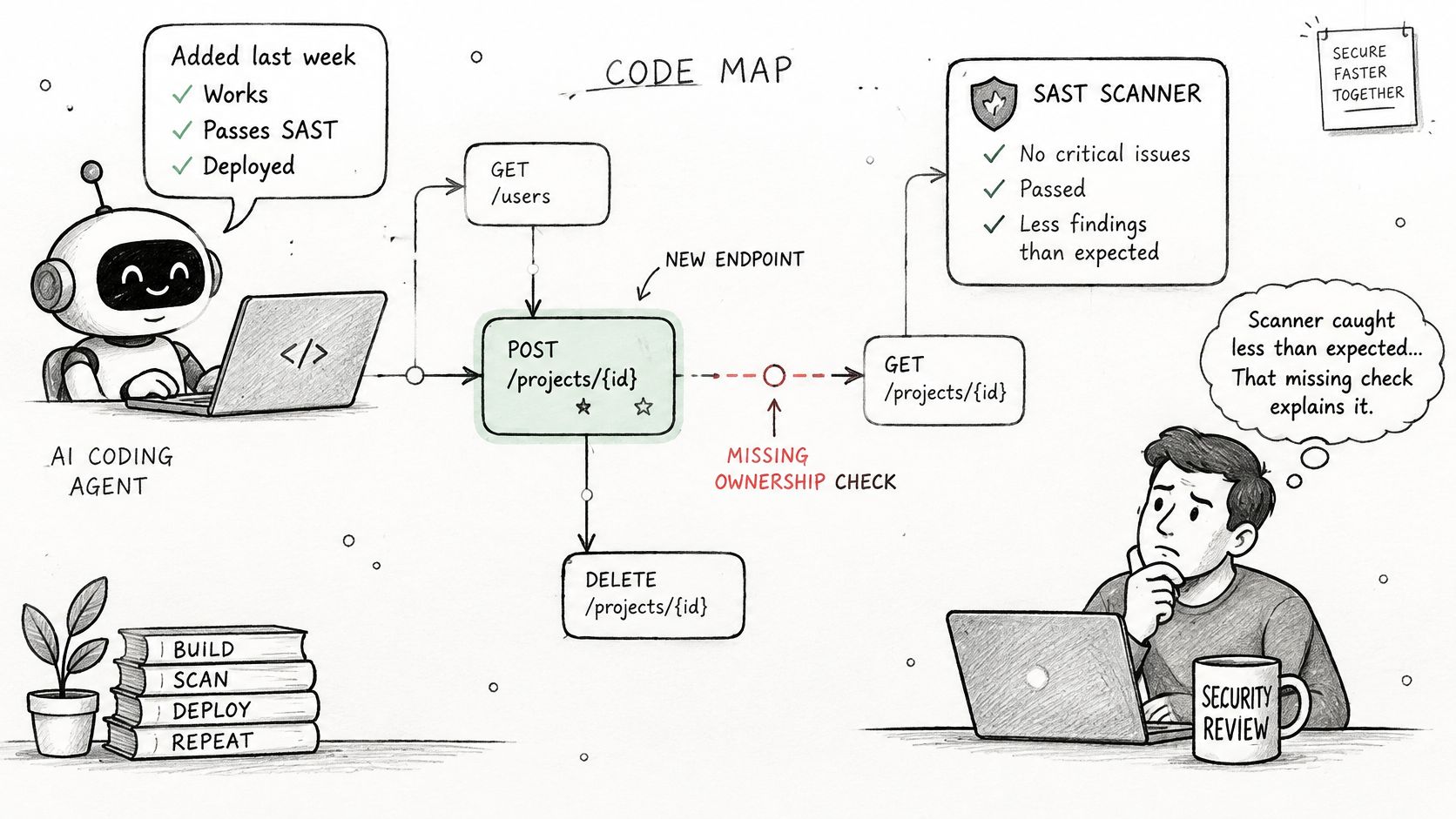
Say an AI coding agent added an endpoint last week. It works, tests pass, and the SAST job is green. But the endpoint skips the ownership check your approved design requires before one customer can view another customer's record.
The scanner didn't miss a syntax pattern. There may be no dangerous function call to flag. The agent optimized for the prompt it received, while the missing check lives in your threat model, trust boundary, and authorization decision.
Iteration Can Add Risk
More scanning after generation doesn't automatically replace lost design context. In one controlled experiment covering 400 code samples and 40 generation rounds, researchers found a 37.6% increase in critical vulnerabilities after only five improvement iterations. A separate large-scale analysis of 7,703 AI-attributed files identified 4,241 CWE instances across 77 vulnerability types, with Python vulnerability rates of 16.18% to 18.50%, compared with 8.66% to 8.99% for JavaScript and 2.50% to 7.14% for TypeScript.
Those numbers don't mean every generated file is unsafe. They mean repeated prompting can shift code away from the original security intent, and your language mix should shape where reviewers look hardest. A Python service that handles files and subprocesses deserves different generated-code checks than a TypeScript front end.
Put Controls Before and During Generation
- Supply approved requirements as context: Give the agent the relevant trust boundaries, authentication rules, and data-handling constraints before it writes code. Don't expect it to infer them from nearby files.
- Tie pull-request checks to design decisions: Test the specific ownership, authorization, and data-flow rules for the feature, not only generic vulnerability patterns.
- Verify the generated change against the threat model: Ask whether new endpoints, fields, jobs, and integrations match the approved design. Record why the change was accepted and which requirement it satisfies.
Our notes on AI coding security extend this workflow for agent-assisted teams. For regulated work, the acceptance record matters as much as the scan result. Auditors need to see not only that code was scanned, but why this change was allowed to merge.
Build Your Scanning Pipeline and First-Week Policy
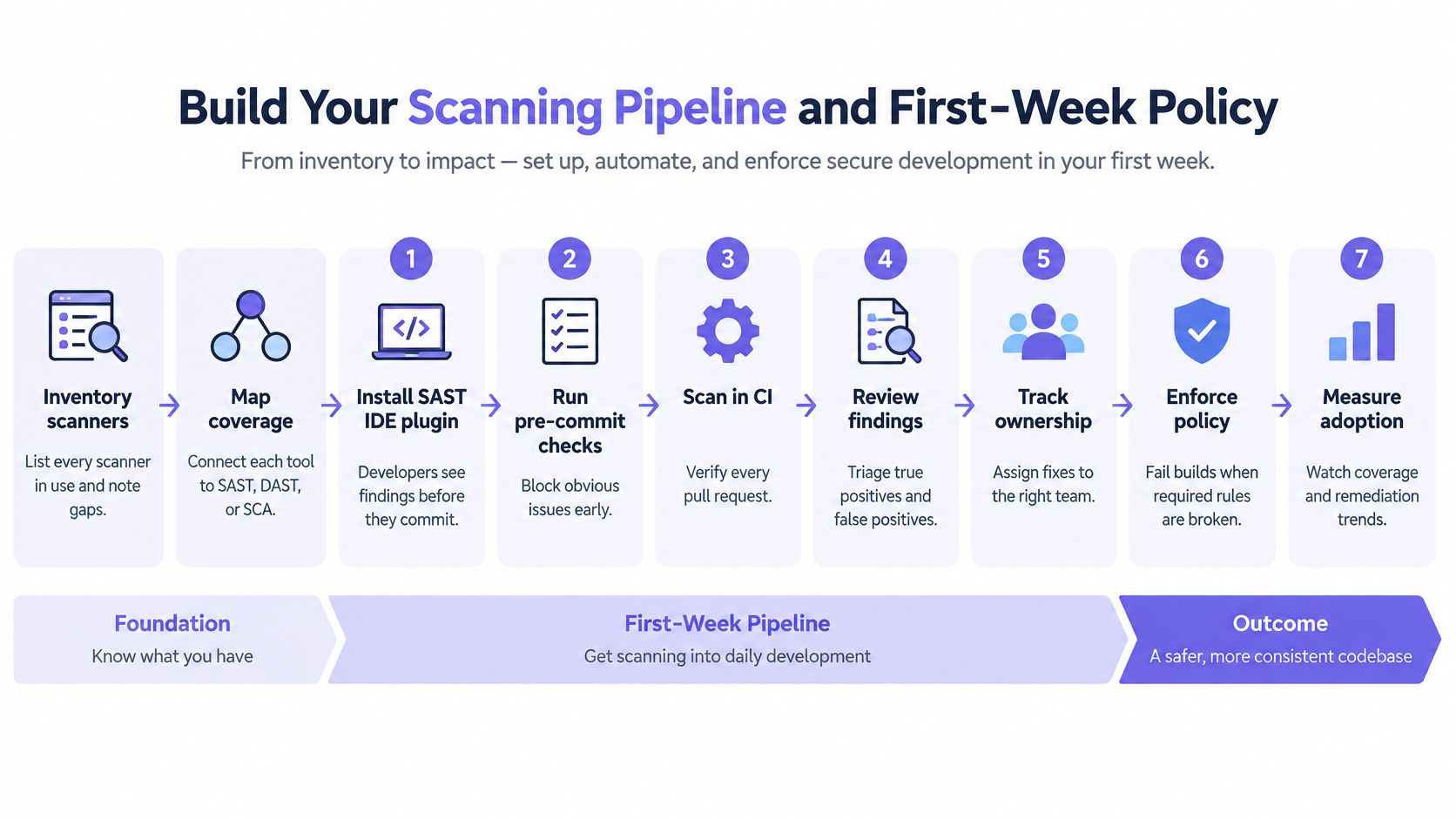
Start with an inventory, not a purchase. List every scanner already in use, map each one to SAST, DAST, or SCA, and note which repositories and languages it covers. You'll often find duplicate SAST tools on one service and no dependency scanning on another.
Seven Steps to a Usable Pipeline
- Install the SAST IDE plugin: Developers see findings before they commit, when the fix is still a small edit. Keep the rule set narrow here so the editor stays usable.
- Run SAST and SCA on every pull request: Scan changed files plus their direct callers so results return in minutes. Scanning only the diff misses flows that enter through unchanged files.
- Begin in report-only mode: Pick one repository and record the first thirty findings as real, false positive, or accepted risk. Two weeks of honest labels will tell you more than a vendor score.
- Promote proven rules to required checks: Start with high-confidence injection rules and other reachable flows from your enforcement table. Expand only after precision stays acceptable.
- Run full scans nightly: Run complete SAST and SCA scans on the default branch to catch cross-file flows and dependency changes that pull-request scans miss.
- Run DAST against staging with authenticated accounts: Give the scanner test users for each major role. Unauthenticated scans never reach protected routes, so they create false confidence.
- Store dispositions with the evidence: Keep each result with its commit hash, rule ID, and disposition. Give every exception a reason, a named owner, and an expiry date.
What Healthy Looks Like in Week One
Pull-request feedback arrives fast enough that developers don't context-switch away from the change. No merge blocks on an unvalidated rule. Every nightly finding has a named owner, and accepted risks expire instead of becoming permanent background noise.
Week-one check: If a developer asks why a check blocked, your team should be able to show the source-to-sink path, the requirement behind the rule, and the exact fix or exception process.
DevArmor is one option to evaluate alongside your existing scanners in this setup. We import findings from SAST, DAST, and SCA scanners and pentest reports, then connect them with system design and threat models. Our reviews run inside the tools developers already use, while security teams keep oversight of a process that's instant and traceable.
Don't try to perfect every repository at once. Prove the loop on one service, measure precision and fix time, then copy the policy to the next repository with its own language and framework quirks.
If your scanners find plenty but your team still can't tell which findings should block a merge, DevArmor can connect those results to your design decisions and threat models so each check enforces a named requirement. Visit us to see how reviews run inside your existing developer tools and turn secure code scanning from a noisy backlog into traceable, policy-backed evidence.
Table of Contents
Subscribe


