GitHub Actions Environment Variables
 Reza Khosravi
Table of Contents
A deployment fails after a workflow change that looked harmless. The value appears in the YAML, the shell script prints the expected configuration, and yet a conditional step skips production or a credential surfaces in a log. The problem usually isn't syntax. It's that GitHub Actions environment variables cross several boundaries, and each boundary has different evaluation and security rules.
Treating env as a universal substitution mechanism creates fragile pipelines. A variable can be available to a shell process but unavailable to workflow logic, visible at job scope when it should have been limited to one step, or stored as configuration even though its value grants access to production. Reliable workflows require a precise model of scope, evaluation order, secret handling, and enforcement.
The Role of Environment Variables in CI/CD Security
A typical failure starts with an operational shortcut. A team adds DEPLOY_TARGET at workflow scope, generates a value later in a setup step, and expects a following if expression to use it. The job runs, but the condition evaluates before the runner receives the generated value. In another version of the same incident, a token is placed in a broad environment mapping, a diagnostic command echoes the environment, and the secret becomes part of the job's observable output.
GitHub Actions environment variables are values made available to workflow steps through the runner environment or the env context. They aren't identical to ordinary Bash variables. A Bash variable exists inside a shell process, while a GitHub Actions variable can be declared at workflow, job, or step level and may also participate in expression evaluation, runner execution, or cross-step state transfer.
GitHub documents that default environment variables are exposed to every step in a workflow run. Those defaults are case-sensitive, and teams can define their own values with env at the workflow, job, or step level. GitHub also separates configuration variables from secrets, which is the first security distinction an application security team should enforce rather than leave to individual authors (GitHub's environment-variable documentation).
Configuration is part of the trust boundary
A value such as a non-sensitive deployment region may be safe to expose broadly. A credential, signing key, or privileged endpoint is different. Putting both into env makes the YAML easier to read, but it also expands the number of steps and actions that can access the value.
The practical risk comes from composition. A third-party action, a shell command that expands an untrusted input, or a debugging statement can all turn a convenient variable into an exfiltration path. Environment variables therefore belong in the same design review as permissions, action dependencies, runner trust, and deployment approvals.
Practical rule: If a step doesn't need a value, don't give that step the value.
That principle is central to CI/CD pipeline security guidance from DevArmor, where workflow behavior is treated as part of the application's security design rather than as disposable build plumbing. A useful external perspective is also CI CD security by CloudCops GmbH, particularly for teams mapping pipeline controls to broader security responsibilities.
The most dependable workflow designs make data flow explicit. They define ordinary configuration at the narrowest useful scope, pass secrets only to the steps that require them, and use contexts when GitHub must make a decision before a runner starts. That approach reduces both deployment surprises and the blast radius of a compromised step.
Understanding Variable Scopes and Precedence Rules
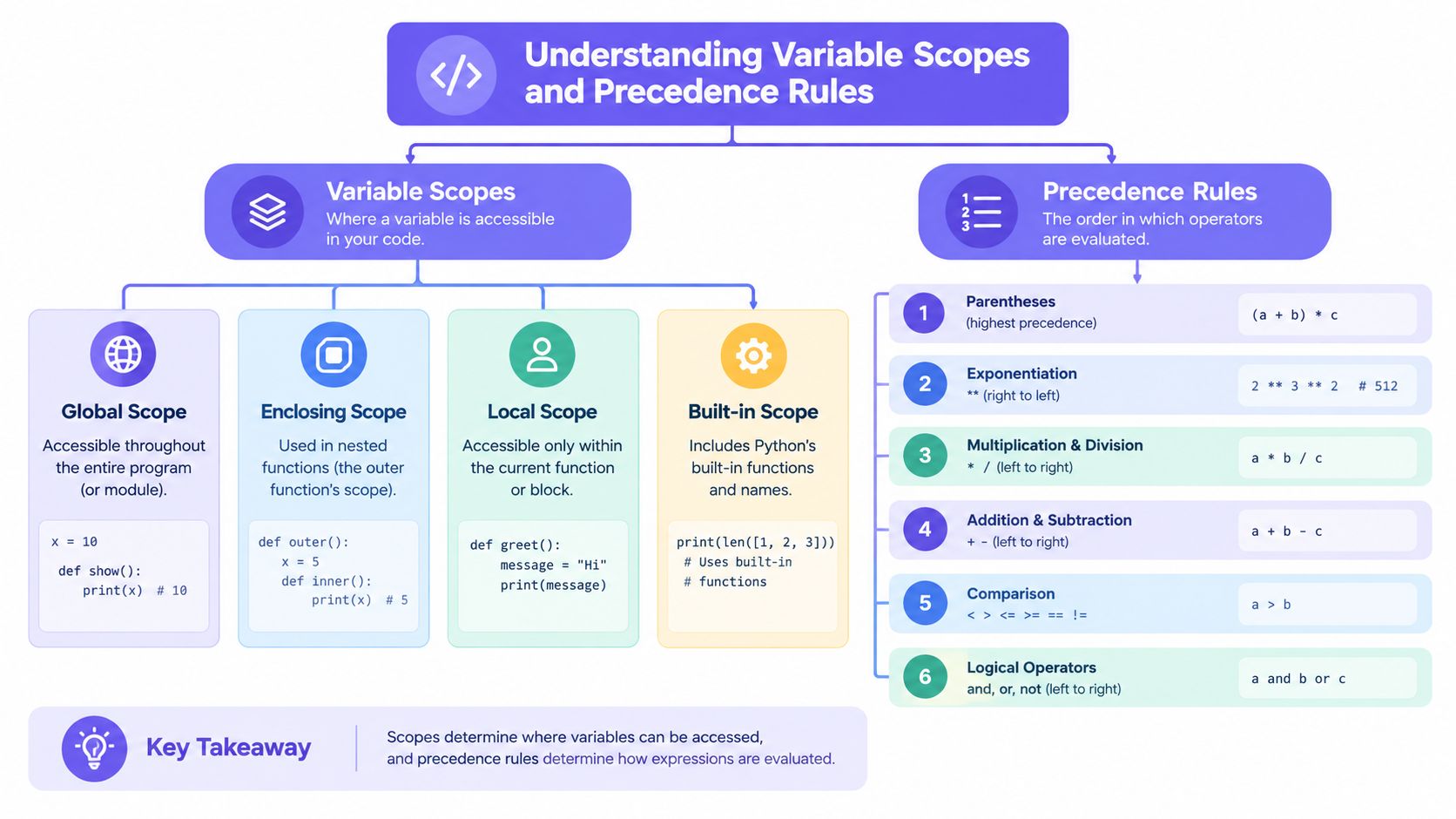
GitHub Actions has three operational scopes for variables defined with env:
- Workflow scope, declared under the top-level
envkey and available throughout the workflow. - Job scope, declared under
jobs.<job_id>.envand available to steps in that job. - Step scope, declared under
jobs.<job_id>.steps[*].envand available only to that step.
GitHub describes these values as available through the env context. Default GitHub-provided environment variables are available to every step, but they aren't exposed through that same context. Their corresponding context properties matter when you author reusable workflows and composite actions (GitHub's variable reference).
Narrower scope should win
When the same variable name is defined at multiple levels, the more specific definition takes precedence during step execution. A step-level value overrides the job-level value, and the job-level value overrides the workflow-level value. The rule is useful, but it can hide configuration drift when engineers don't realize that a local override exists.
env:DEPLOY_MODE: "validation"jobs:deploy:runs-on: ubuntu-latestenv:DEPLOY_MODE: "staging"steps:- name: Validaterun: echo "$DEPLOY_MODE"- name: Production deploymentenv:DEPLOY_MODE: "production"run: echo "$DEPLOY_MODE"The first step receives staging. The second receives production. The workflow-level declaration remains a fallback, not an immutable policy.
For security-sensitive values, use scope as an access-control mechanism. A build job may need a package registry configuration, while a release step needs a deployment credential. Giving both jobs the same job-level environment creates unnecessary exposure. A step-level mapping makes the intended boundary visible in code review and easier to test with static policy.
Avoid shadowed state
Shadowing becomes especially dangerous when a later step writes a value to GITHUB_ENV while a broader scope already supplies the same name. The generated state may look correct in the producing step, but a pre-existing declaration can make the actual behavior difficult to reason about. Use distinct names for static configuration and runtime results, or remove the broader declaration before introducing dynamic state.
A good review question is simple: Where is this value first declared, where can it change, and which scope wins at the point of use? If the answer requires tracing multiple files, reusable workflows, and composite actions, the variable needs a clearer owner.
Syntax Patterns and Context Evaluation Mechanics
Start with static configuration when the value is known before the job runs. The env key is the clearest option for values that belong to the workflow definition.
name: Buildon:push:env:BUILD_MODE: "release"jobs:package:runs-on: ubuntu-latestenv:OUTPUT_DIR: "dist"steps:- uses: actions/checkout@v4- name: Package applicationenv:PACKAGE_LABEL: "nightly"run: |echo "Mode: $BUILD_MODE"echo "Output: $OUTPUT_DIR"echo "Label: $PACKAGE_LABEL"Inside run, the shell reads runner environment variables with shell syntax such as $BUILD_MODE. GitHub Actions expressions use a different form, such as ${{ env.BUILD_MODE }}, and are evaluated by GitHub according to the location and processing phase of the workflow. Don't treat the two forms as interchangeable.
Passing state between steps
When a value is calculated during execution, append it to GITHUB_ENV.
steps:- name: Calculate build labelrun: echo "BUILD_LABEL=release-candidate" >> "$GITHUB_ENV"- name: Use build labelrun: echo "Building $BUILD_LABEL"The second step can read BUILD_LABEL. The step that writes the value can't read the newly written value through its environment, because the runner applies that update only to subsequent steps in the same job. This is a frequent source of false debugging conclusions. A command can successfully write to GITHUB_ENV while still seeing an empty value in the current process.
For values that must cross job boundaries, GITHUB_ENV isn't the right mechanism. Design an explicit job output or artifact interface instead, and keep the data contract narrow. A later job should consume a named result rather than inherit an opaque collection of runner state.
Keep the two namespaces separate
The env context contains variables set in a workflow, job, or step. Default GitHub-provided environment variables are exposed to steps, but GitHub documents them separately from the env context. When a reusable workflow or composite action needs a default value, use the documented context property that represents it rather than assuming every runner variable is available as env.SOMETHING.
A dependable authoring pattern is:
- Use
${{ ... }}when GitHub must resolve a value as part of workflow processing. - Use
$NAMEwhen the shell running on the runner should resolve a value. - Use
GITHUB_ENVonly for values needed by later steps in the same job. - Use explicit inputs, outputs, or artifacts when data must cross a job or reusable-workflow boundary.
That separation makes the workflow easier to lint and prevents a shell-side assumption from becoming a control-plane bug.
Navigating Evaluation Order and Conditional Logic Bugs
The most persistent misconception is that env behaves like a global variable available everywhere in the YAML. It doesn't. GitHub processes portions of a workflow before it sends jobs to a runner, while shell commands execute later on that runner. A value created during runtime can't retroactively influence decisions that GitHub already evaluated.
This matters for if conditionals and matrix logic. Runner environment variables aren't available in workflow parts that GitHub evaluates before runner execution. Use a context that exists at that phase, such as an event, input, or job output, rather than expecting $TARGET or env.TARGET to contain a value produced by a previous shell command.
Refactor the decision point
A fragile pattern looks like this:
steps:- name: Detect targetrun: echo "TARGET=production" >> "$GITHUB_ENV"- name: Deployif: env.TARGET == 'production'run: ./deploy.shThe detection step updates the runner environment for later execution, but it doesn't make the value available to GitHub's earlier conditional evaluation in the way the author expects.
Move the decision into a supported context. For example, define the target as a workflow input for a manual run, or produce a job output and consume that output from a dependent job. If the decision is purely shell logic, keep it inside the shell:
- name: Detect and deployrun: |target="production"if [ "$target" = "production" ]; then./deploy.shfiThe correct choice depends on whether GitHub or the runner owns the decision. The important part is to make that ownership explicit.
Debug the phase, not just the value
When a condition behaves unexpectedly, ask four questions:
- Who evaluates this expression? GitHub or the runner shell?
- When does the value exist? At workflow processing time or after a prior step?
- Which context contains it?
env,github,inputs,needs, or another documented context? - Does a broader declaration shadow it? Check workflow and job scopes before blaming the shell.
Matrix construction has the same boundary. A matrix is created before the job's steps run, so a value generated inside a step can't define that matrix directly. Generate the data in an earlier job, expose a controlled output, and let a dependent job consume it through the supported expression mechanism.
Composite actions and reusable workflows add another layer of indirection. Pass values as explicit inputs and declare required outputs. Hidden reliance on inherited environment state may work in one caller and fail in another, especially when the caller uses a different scope or evaluation phase.
Managing Secrets and Configuration Variables Securely
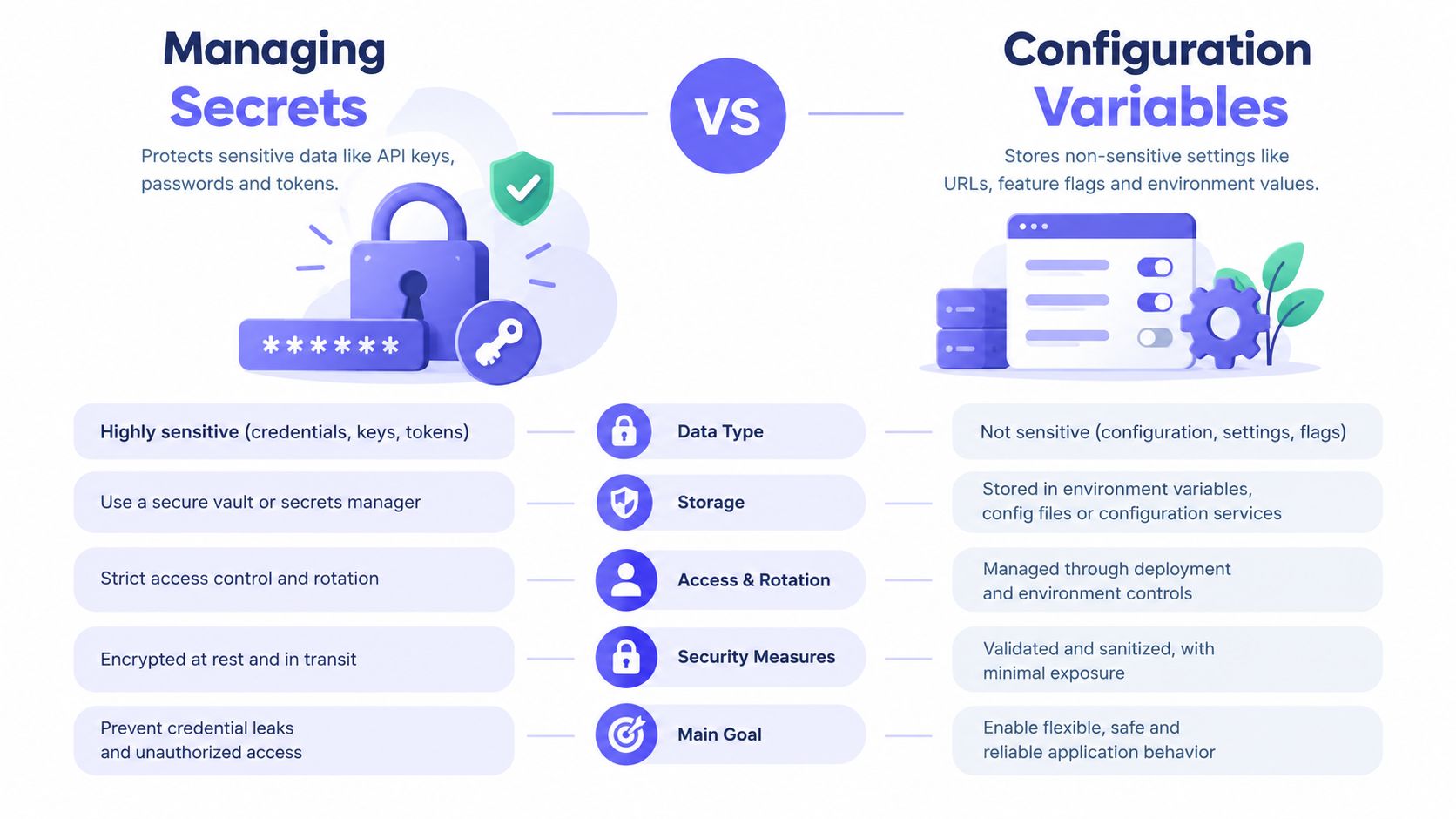
Configuration variables and secrets serve different purposes. Configuration variables hold non-sensitive values that workflows may need, while secrets protect sensitive values and should be passed explicitly where they are required. GitHub supports configuration variables at the organization, repository, and environment level. Variables stored in an environment are available only to jobs that reference that environment, while secrets are restricted to explicit workflow use (GitHub's variables reference).
Choose storage by sensitivity
A repository-level configuration variable can be appropriate for a non-sensitive build mode. An organization-level variable can centralize shared, non-sensitive configuration. An environment-level variable is useful when the value belongs only to jobs that explicitly reference a deployment environment.
Secrets deserve a narrower path:
jobs:deploy:environment: productionruns-on: ubuntu-lateststeps:- name: Deployenv:DEPLOY_TOKEN: ${{ secrets.DEPLOY_TOKEN }}run: ./deploy.shThe workflow passes one named secret to one step. That is safer than exposing a broad secrets collection or mapping every credential into a job-level environment.
GitHub's model reflects least privilege. A secret isn't automatically available just because it exists in the repository or environment. The workflow must explicitly use it, and environment-scoped values are limited to jobs that reference the corresponding environment.
Logging is an execution risk
Masking helps, but it isn't a substitute for disciplined handling. Don't echo secrets, serialize the full environment, include credentials in generated artifacts, or pass sensitive values as command-line arguments when the process may expose them through diagnostics. Avoid putting secret-bearing files into logs and artifacts, even when the value itself is masked.
Review action inputs with the same care as shell commands. A third-party action that receives a secret can process it according to its implementation, so the trust decision includes the action, its dependencies, and the runner context. Teams looking beyond GitHub-specific syntax can compare approaches in this practical guide to secrets management for mobile CI/CD.
Security boundary: A secret should enter the workflow as close as possible to the step that consumes it, and it should leave no deliberate diagnostic trail.
Don't use configuration variables as a disguised secret store. Their broader visibility and intended role make them unsuitable for credentials. Conversely, don't put harmless settings into secrets just because the secrets interface is convenient. Clear classification supports rotation, review, audit evidence, and policy enforcement.
Enforcing Variable Policies with DevArmor and CI Guardrails
YAML review catches obvious mistakes, but it doesn't reliably enforce organizational intent. A team may agree that production credentials require an environment boundary, yet a later pull request can move the secret to workflow scope without changing the deployment code. The configuration still parses, tests may pass, and the security boundary has weakened.
Policy-as-Code turns that design decision into a reviewable control. Define rules such as:
- Production secrets must be referenced only by jobs that declare the approved environment.
- Sensitive names must not appear in workflow-level
env. - Deployment jobs must not pass the full secrets context to an action.
- Runtime state written through
GITHUB_ENVmust not originate from untrusted pull request content. - Approved reusable workflows must receive explicit inputs and secrets rather than broad inheritance.

Make controls enforceable at pull request time
A useful guardrail should inspect the actual workflow change, identify the affected trust boundary, and return a result developers can act on. Static analysis tools can flag suspicious syntax, while repository policy can establish what is permitted for a specific service or environment. Neither replaces a threat model, but together they reduce the chance that a known architectural decision remains only in a document.
DevArmor supports continuous threat modeling, security design reviews, and Policy-as-Code enforcement across the software delivery lifecycle. Its GitHub integration can connect repository context to review policies, surface results in pull-request workflows, and support blocking unsafe merges when configured. For teams defining the control model itself, Policy-as-Code guidance from DevArmor provides relevant context.
The policy should express intent, not merely prohibit strings. A rule that blocks every variable containing TOKEN may create noise and encourage bypasses. A stronger rule distinguishes a non-sensitive build label from a credential, understands whether the job targets a protected environment, and checks whether the value is passed only to the required step.
Protect against generated workflow drift
AI-assisted coding makes this more important. A coding agent can produce valid YAML that places a secret at the wrong scope, uses a runtime value in a pre-run conditional, or copies a broad environment mapping from another repository. The output may look idiomatic while violating local security design.
Keep the approved architecture machine-readable. Then evaluate each workflow change against that context:
- Identify variables and their declared scopes.
- Classify references to secrets, configuration variables, contexts, and runner files.
- Match deployment jobs to approved environments.
- Reject unsafe patterns before merge.
- Record the decision for later review.
The control should also offer a path for legitimate exceptions. A service may need a narrowly approved organization variable or a special reusable workflow. Capture that exception explicitly, with an owner and rationale, instead of weakening the general rule.
Guardrails work best when they complement developer feedback. Explain which boundary was violated, point to the relevant workflow location, and show the permitted pattern. A blocked merge without a usable remediation path moves the work into a less visible channel.
Platform Quotas and Scale Limits for Enterprise Workflows
A workflow can pass review and still fail after repository growth. More environments, inherited variables, and parallel jobs increase configuration exposure, while oversized values make failures harder to diagnose. GitHub documents limits that should shape the design before expansion. Treating variables as convenient storage for certificates, generated manifests, or structured blobs creates both capacity and governance problems.
The documented limits are:
| Scope / Metric | Maximum Limit |
|---|---|
| Individual variable size | 48 KB |
| Organization variables | 1,000 |
| Repository variables | 500 |
| Environment variables | 100 |
| Combined variable size per workflow run | 10 MB |
These figures come from GitHub's enterprise variable guidance, including its GitHub Actions variable limits. Apply them as architecture constraints, not as a late-stage troubleshooting reference.
Store the right kind of data in the right place
Use a variable for a compact configuration value. Move larger or structured content to a controlled configuration service, artifact repository, or versioned file with suitable access controls. Where possible, keep the variable as a reference, identifier, or selector.
Large values also weaken review and debugging. Authors cannot quickly determine how a multiline payload is consumed, and policy checks may struggle to classify content hidden inside an opaque string. Smaller, named values make ownership, access, and rotation easier to verify.
Enterprise audit checklist
Run this checklist during repository onboarding and before adding an environment:
- Inventory ownership: Record the team responsible for each organization, repository, and environment variable.
- Classify sensitivity: Separate non-sensitive configuration from secrets before choosing storage. Keep that classification current as policies change by following security policy update practices.
- Measure size: Check individual values and aggregate workflow exposure against the documented limits.
- Remove duplication: Consolidate repeated configuration only when broader scope does not expand access.
- Review lifecycle: Define who rotates, retires, and approves each value.
- Prefer references: Store identifiers or selectors instead of generated content.
- Test expansion: Run workflows with the full set of environments and variables they will use.
Platform selection may also require comparing configuration, execution, and governance controls across automation products. Teams can compare AI automation platforms, while remembering that GitHub Actions limits still govern workflows executed on GitHub.
Quota pressure often reveals a governance gap. If nobody can explain why a variable exists, who can read it, or whether it remains necessary, adding storage only postpones the failure. Use limits to simplify the configuration model, assign ownership, and enforce scope through review or policy checks.
Quick Reference Lookup for Workflow Authors
A reliable workflow author needs a compact mental model:
- Workflow
env: Broad fallback configuration for the workflow. - Job
env: Configuration shared by steps in one job. - Step
env: Narrow exposure for one step. - Default variables: GitHub-provided values available to every step, with corresponding context properties where documented.
envcontext: Values declared at workflow, job, or step level.GITHUB_ENV: Runtime values for subsequent steps in the same job.- Shell expansion:
$NAMEinside a runner shell. - Expression evaluation:
${{ ... }}in GitHub Actions expressions. - Workflow decisions: Use supported contexts for conditionals and matrix construction.

Use this review sequence
When a value behaves unexpectedly, inspect it in this order:
- Declaration: Find every place the name is defined.
- Scope: Confirm whether workflow, job, or step scope is appropriate.
- Phase: Decide whether GitHub or the runner evaluates the consuming expression.
- Availability: Check whether the value exists before the consuming step or conditional.
- Sensitivity: Confirm that a configuration variable isn't carrying a secret.
- Exposure: Verify that only the required step receives the value.
- Boundary: Use outputs or explicit inputs for cross-job and reusable-workflow data.
- Policy: Check whether the repository's guardrails permit the pattern.
A few small patterns prevent many failures:
env:BUILD_MODE: "release"jobs:test:runs-on: ubuntu-lateststeps:- name: Set runtime valuerun: echo "TEST_LABEL=unit" >> "$GITHUB_ENV"- name: Consume runtime valuerun: echo "$TEST_LABEL"Don't expect the first step to see the value it writes. Don't use a runner-generated environment variable to control a conditional that GitHub has already processed. Don't broaden a secret's scope just because a later action might need it.
The strongest workflow files make their data flow obvious to a reviewer who didn't write them. Static configuration is declared where its ownership is clear, runtime state has an explicit producer and consumer, secrets are passed narrowly, and policy checks enforce the security decisions that syntax alone can't guarantee.
DevArmor helps teams connect continuous threat modeling and security design reviews to Policy-as-Code checks across GitHub pull requests. Use DevArmor to define enforceable rules for environment-variable scope, secret handling, and workflow boundaries, then give developers actionable feedback before unsafe CI/CD changes merge.
Table of Contents
Subscribe